Do you need to install MOSS-Image? ComfyUI vs a browser
Compare the three documented ways to run MOSS-Image — the free Spaces demo, local ComfyUI with the int8 weights, or a hosted studio.
You do not have to install MOSS-Image to try it: the project links to a free Hugging Face Space demo and to hosted browser tools, while running the weights on your own machine requires a local setup such as ComfyUI. Choose the browser route for a first look; choose ComfyUI if local control is the point.
TL;DR
- The Hugging Face Space is a free demo, not a promise of an API or local control.
- Local ComfyUI means installing ComfyUI and placing the model files in the documented folders.
- A hosted studio avoids managing those local files and offers its own interface and terms.
- These are different ways to access MOSS-Image; the supplied sources do not compare their speed.
What are the three ways to try MOSS-Image?
The project README links to a Hugging Face Spaces demo, and its ComfyUI guide documents running MOSS-Image locally. MOSS Image Studio is a hosted browser studio that runs the same open model and includes a visual box editor. Those options answer different needs: previewing a demo, setting up a local workflow, or using a hosted interface.
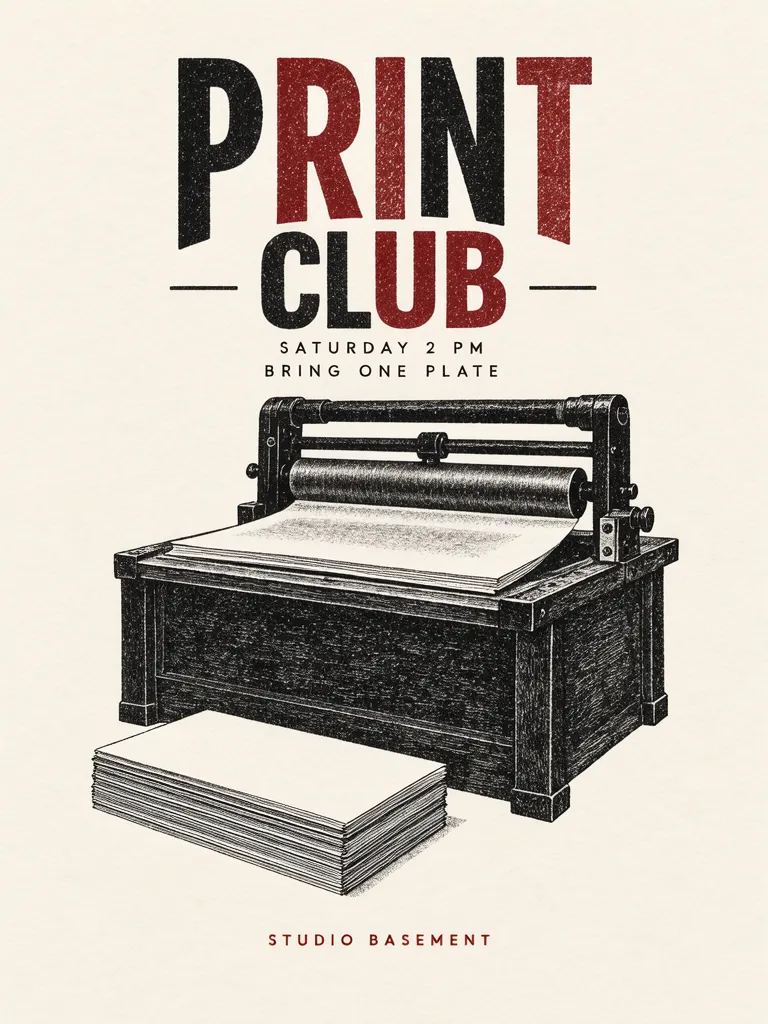
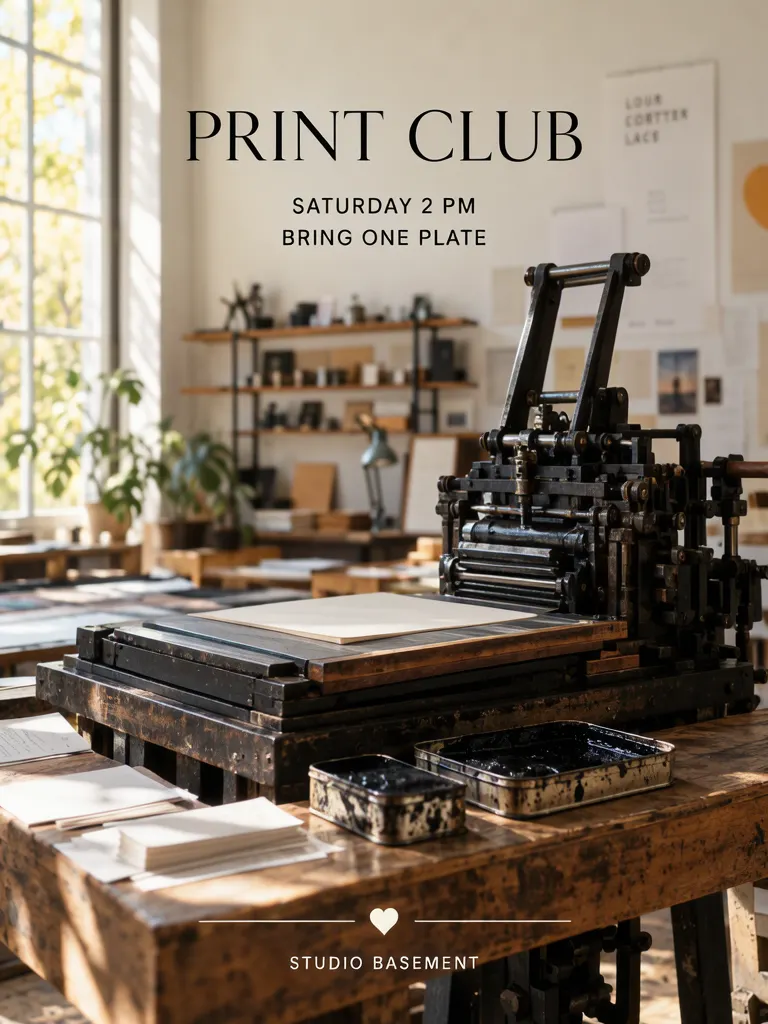
The two sample prompts below keep the copy fixed and change the visual treatment. One describes a flat letterpress poster; the other places the type over a small studio scene. They illustrate the kind of brief you can try in the studio, rather than a speed or quality comparison between services.
The print club, studio and schedule in these sample images are fictional.
Make one like this Open this image on MOSS Image
Made in prompt mode with this exact prompt:
Letterpress print club poster, warm off-white paper, two-colour ink in brick red and ink black, a printing press roller and stacked paper edges shown as a flat still life, generous margin around the type. Text, render exactly and add nothing else: headline 'PRINT CLUB'; line 'SATURDAY 2 PM'; line 'BRING ONE PLATE'; footer 'STUDIO BASEMENT'.
Make one like this Open this image on MOSS Image
Made in prompt mode with this exact prompt:
Photograph of a small letterpress studio, a press and ink tins on a wooden bench, daylight from the left, poster area clean and uncluttered in the upper half. Text, render exactly and add nothing else: headline 'PRINT CLUB'; line 'SATURDAY 2 PM'; line 'BRING ONE PLATE'; footer 'STUDIO BASEMENT'.
What does local ComfyUI require?
The ComfyUI documentation describes an install-and-configure route. The SFT templates load the instruction-tuned checkpoint, moss_image_sft_int8_convrot.safetensors; the Base checkpoint is moss_image_base_int8_convrot.safetensors. The text encoder used by the four text-to-image templates and the edit template is qwen3.5_9b_w4a8_gptq.safetensors, loaded with CLIPLoader type moss_image. The VAE is flux2-vae_small.safetensors.
The documented folders are models/diffusion_models/, models/text_encoders/ and models/vae/. That means local use gives you the downloaded weights to run on your own GPU, with no API key or per-image credits, but requires ComfyUI, the right files and folders, and compatible local hardware. The guide also lists BF16 builds for more VRAM; it does not give a single hardware figure that applies to every machine.
For the setup sequence and templates, see the ComfyUI MOSS-Image guide and the MOSS Image tool page. The guide is the place to check when you want to reproduce a local workflow; this article does not claim that the browser options use the same templates or controls.
What can a browser option do, and what does it leave out?
A Hugging Face Space is linked as a free demo. It avoids arranging your own ComfyUI files just to see a demonstration, but the supplied Space reference does not state API access, quotas, persistent storage or local model control. Treat it as a demo rather than assuming those features.
The hosted studio is another browser route. The site runs the same open model with a visual box editor. Its terms are three free images without a card, then credit packs; each generated image gets a public share link. You do not need to place model files in local ComfyUI folders to use that interface. The tradeoff is that a hosted studio is not the same as controlling a local ComfyUI installation.
Local ComfyUI makes the weights available on your own GPU, but it does not remove the work of installing ComfyUI, downloading files and matching them to the right template. None of these descriptions establishes that one option is faster. Pick based on where you want the setup and control to live.
MOSS Image Studio is an independent hosted studio for the open MOSS-Image model. Not affiliated with OpenMOSS.
What are the limitations of this comparison?
The sources establish the Space demo, a documented ComfyUI path, and the hosted services, but do not give a controlled comparison of their output, availability or speed. The Space reference does not publish the operational details listed above, so they should not be inferred. Local results also depend on a correct setup; the guide documents file placement and loader type, but this post does not claim that installation is automatic.
The two poster prompts are examples, not a benchmark. They use the same four lines of copy and different scene descriptions. Inspect generated lettering before using it in a real poster; the blur and background report covers one case where a soft background was mistaken for a focus failure.
FAQ
Do I need to install anything to try MOSS-Image?
No. The project README links to a Hugging Face Space demo, and browser-based hosted options are available. Installation is needed for the documented local ComfyUI route.
Is the local model free to run?
The weights are under Apache 2.0, and the ComfyUI guide describes downloading them and running on your own GPU without an API key or per-image credits. You still need the local setup and hardware.
Which option is faster?
The supplied sources do not compare speed, so there is no supported answer here.
Sources
- ComfyUI MOSS-Image guide: checkpoints, file locations, templates and local-use terms. Checked on 2026-11-12.
- OpenMOSS MOSS-Image README: MOSI API Platform and Hugging Face Spaces links. Checked on 2026-11-12.
- MOSS-Image on Hugging Face Spaces: linked demo. Checked on 2026-11-12.
- MOSS Image Studio: site terms for hosted use. Checked on 2026-11-12.
Try it with your own words
Open the Studio, write a brief or lay out boxes on the canvas, and generate with MOSS-Image.