Real Customer Case: A Snack Shop Check-In Poster in MOSS
See how we built a three-step snack shop check-in poster in MOSS, pairing crab-roe soup dumplings with a cola or Sprite reward and clear instructions.
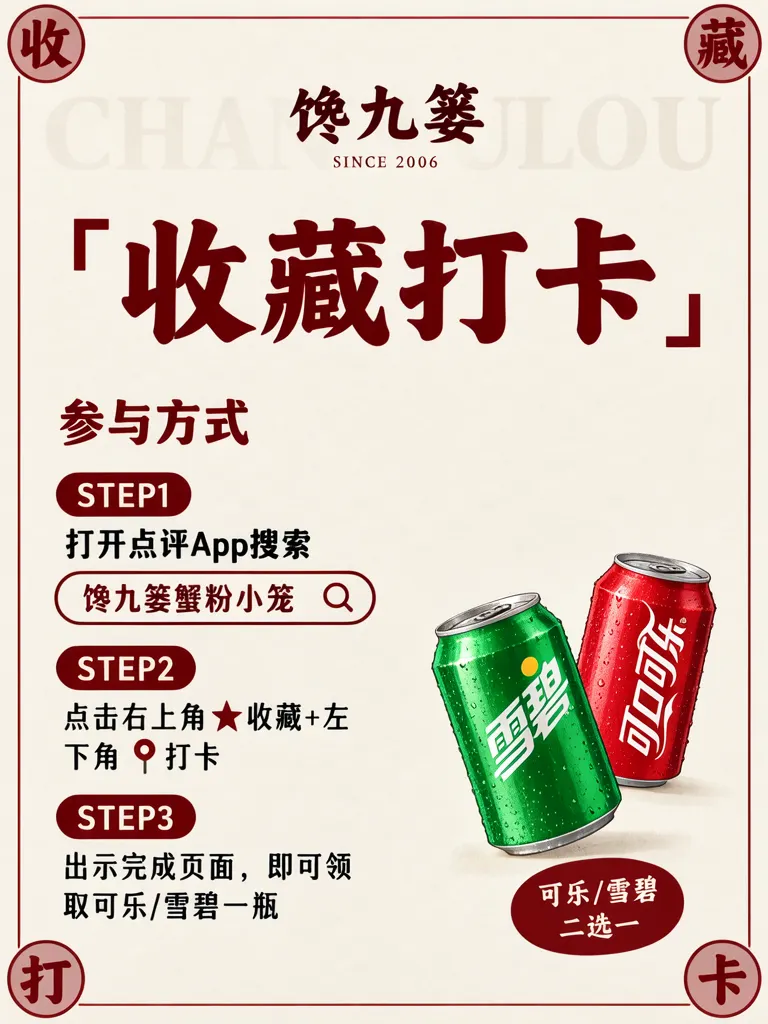
A snack shop needs a check-in promotion poster by its entrance: complete three steps in a review app, show the completed page, and receive cola or Sprite. This is a real customer case; the shop’s real name and signature product name have been replaced with pseudonyms.
TL;DR
- Keep search, save/check-in, and reward redemption in a clear three-step order.
- State that the reward is one cola or Sprite, so the choice is easy to understand.
- Product photos connect the shop’s crab-roe soup dumplings with the chilled-can giveaway.
- Any prices or figures used as examples are placeholders and should be checked against the shop’s confirmed offer.
How do the product photos tell one small shop story?
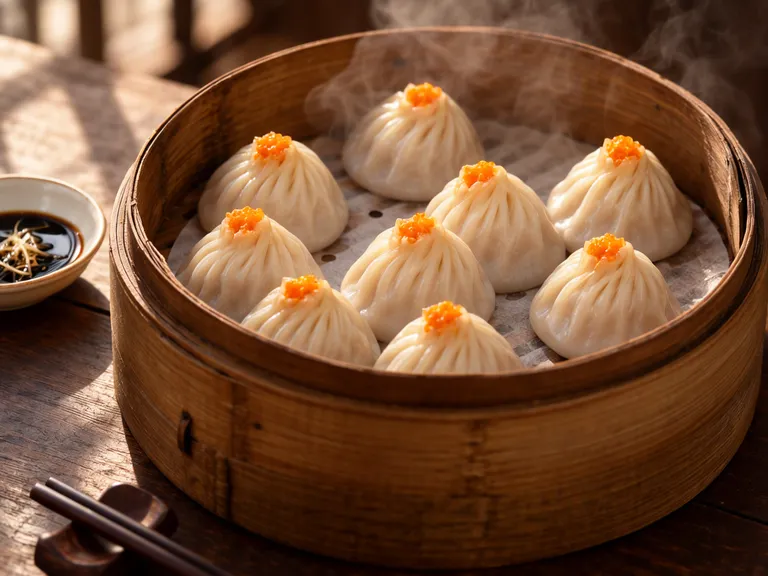
The signature item is called “Chanjiulou Crab-Roe Soup Dumplings.” In the photo, the dumplings sit in a bamboo steamer, their thin pleated wrappers topped with a little orange crab roe. A dish of black vinegar and ginger sits alongside them. Warm side light and a dark wooden table make the food feel freshly served. This image gives the doorway poster a food-centered anchor before it explains the promotion.
Make one like this Open this image on MOSS Image
Made in prompt mode with this exact prompt:
Close-up food photograph of a bamboo steamer of crab-roe soup dumplings (xiaolongbao), thin pleated skins, a little orange crab roe on top, steam rising, a small dish of black vinegar with ginger shreds beside it, warm side light, dark wooden table. Nothing in the picture carries any writing: no labels, logos, stickers or printed marks.
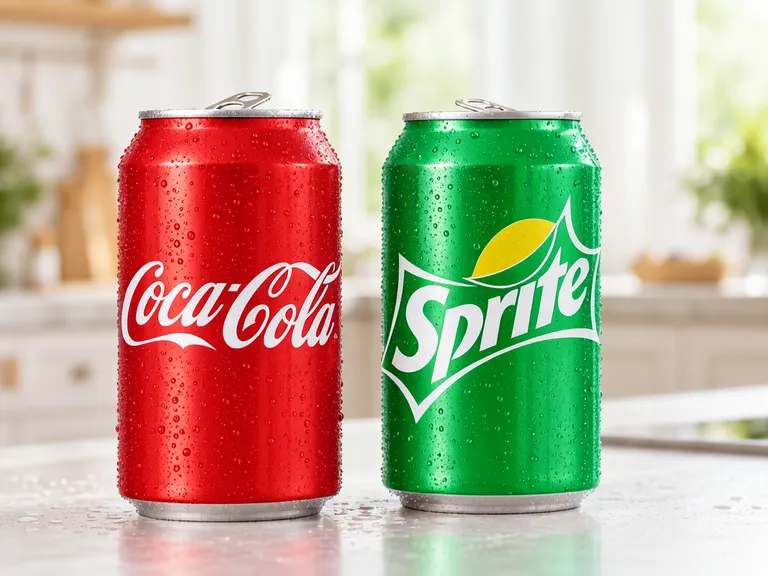
The giveaway is a choice of cola or Sprite. A second product photo places a red and a green chilled can side by side on a light counter. Condensation and soft daylight make the drinks look cool; paired with the steaming dumplings, the image supplies a simple hot-and-cold contrast and makes the two-choice reward concrete.
Make one like this Open this image on MOSS Image
Made in prompt mode with this exact prompt:
Product photograph of two chilled soda cans side by side on a light counter with water droplets: a red Coca-Cola can and a green Sprite can, soft daylight, shallow depth of field. The only writing in the picture is the printed brand name on each can: 'Coca-Cola' on the red can and 'Sprite' on the green can.
How does the doorway poster organize its three steps?
We used warm ivory paper, a narrow inset red border, and red and black lettering for a flat printed-artwork look. The large dark-red brush lettering “「收藏打卡」” (“Save and check in”) is the first thing to notice. Below it, “参与方式” (“How to take part”) introduces STEP1, STEP2, and STEP3. Each step covers one action, ending with the instruction to show the completed page and claim a bottle of cola or Sprite. Rounded red step capsules echo the corner seals, while the cans at lower right illustrate the reward.
What text boxes are on the finished poster?
Make one like this Open this image on MOSS Image
Trademarks and copy in the image have been altered to avoid infringement.
Made in the Layout Builder with these boxes:
| Box text | Type and look |
|---|---|
| CHANJIULOU | Oversized, very faint pale-grey capitals behind the other elements |
| SINCE 2006 | Tiny red serif capitals |
| 收 / 藏 / 打 / 卡 | Dark-red brush characters on pale-red round seals |
| 馋九篓 | Dark-red brush lettering |
| 「收藏打卡」 | Very large dark-red brush lettering with corner quotes |
| 参与方式 | Medium red bold Chinese lettering |
| STEP1 / STEP2 / STEP3 | White bold Latin letters on rounded red capsules |
| 打开点评App搜索 | Black Chinese lettering |
| 馋九篓蟹粉小笼 | Small dark-red lettering in an outlined search bar |
| 点击右上角★收藏+左 / 下角 📍打卡 | Black Chinese lettering with a red star and location pin |
| 出示完成页面,即可领 / 取可乐/雪碧一瓶 | Black Chinese lettering |
| 雪碧 / 可口可乐 | White lettering printed on the green and red cans |
| 可乐/雪碧 / 二选一 | White lettering on a solid red oval badge |
How can I make a similar shop promotion poster?
- Write the participation instructions as three steps, one action per step, and confirm the reward and redemption condition.
- Start in the AI poster generator; prepare the product photos first, then use the Layout Builder to reserve boxes for the headline, steps, and reward.
- Place the product photos before the copy, then set the reading order and red-and-black type hierarchy around them.
- Proofread the shop pseudonym, search phrase, star and pin symbols, and “cola/Sprite, choose one.” Check type at the distance customers will view it from the entrance.
MOSS Image Studio is an independent hosted studio for the open MOSS-Image model. Not affiliated with OpenMOSS.
FAQ
Can I copy the review-app steps directly?
First confirm which platform the shop uses, where the relevant actions appear, and what the giveaway rules are. Replace the example instructions with the shop’s current process and update the poster if the interface or terms change.
Why put the reward in the last step?
Readers can first see what they need to do, then what they receive after completion. The redemption condition should match the shop’s actual offer.
Are prices or numbers in the image real?
Prices or figures used in an example are placeholders. This case focuses on the participation steps, and any displayed information should still be checked before publication.
Try it with your own words
Open the Studio, write a brief or lay out boxes on the canvas, and generate with MOSS-Image.