How to Write a Promotion Poster for One Product Offer
Plan a one-product promotion poster with a clear offer, visible conditions, and accurate price treatment, then proof every amount before sharing.
A one-product promotion poster should identify the product, state one offer, and place the conditions where a customer can read them with the offer. Our thermos-cup examples show a second-item-half-price deal and a member price, each with qualifying terms. The shop, product, prices and dates are invented examples. Before using your own poster, make sure the condition box describes the actual offer and every price matches the seller's approved details.
TL;DR
- Name one product and state one clear offer.
- Put eligibility, limits and end dates together in a separate conditions area.
- A crossed-out original price implies that the product was previously sold at that price; use it only when true.
- Compare every price and condition with the approved offer, including the small text.
What belongs on a one-offer promotion poster?
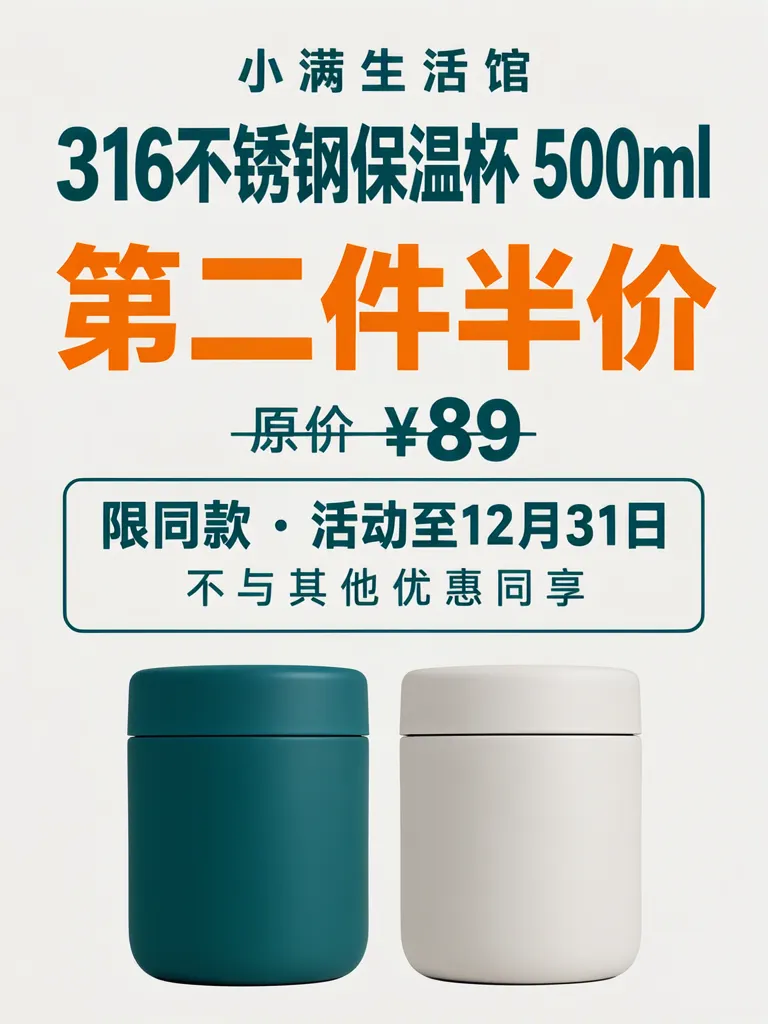
Keep the product, offer and conditions distinct. The layout example names a 316 stainless-steel 500 ml thermos cup, gives “第二件半价” (“Second item half price”), and puts “限同款 · 活动至12月31日” (“Same model only · offer through Dec. 31”) and “不与其他优惠同享” (“Cannot be combined with other offers”) in a box. These are the important pieces: what is sold, what the buyer gets, and what limits apply.
The shop, item, price and promotion wording are invented for the example.
Make one like this Open this image on MOSS Image
Made in the Layout Builder with these boxes:
| Box text | Purpose | Approximate position |
|---|---|---|
| 小满生活馆 | Shop name | Top |
| 316不锈钢保温杯 500ml | Product | Upper area |
| 第二件半价 | Offer | Large centre |
| 原价 ¥89 | Original price | Below offer |
| 限同款 · 活动至12月31日 | Eligibility and end date | In outlined box |
| 不与其他优惠同享 | Additional condition | Same box, below |
| (two plain thermos cups) | Product illustration | Bottom |
All six required lines came out right on the first try. The layout also struck through “原价 ¥89,” although we did not ask for that. A crossed-out price implies that the product was previously sold at that price, so use that treatment only if it is true for your promotion. The cups look more like short food jars than tumblers; that may matter if the picture is meant to match the actual product closely.
How do you make membership conditions easy to notice?
Put the member price and its eligibility in the same visual group. The photo version uses “会员价 ¥69” (“Member price ¥69”), followed by “注册会员即可购买” (“Available to registered members”) and “每人限购2个” (“Limit two per person”). The card makes it clear that the price is conditional and that a quantity limit applies.
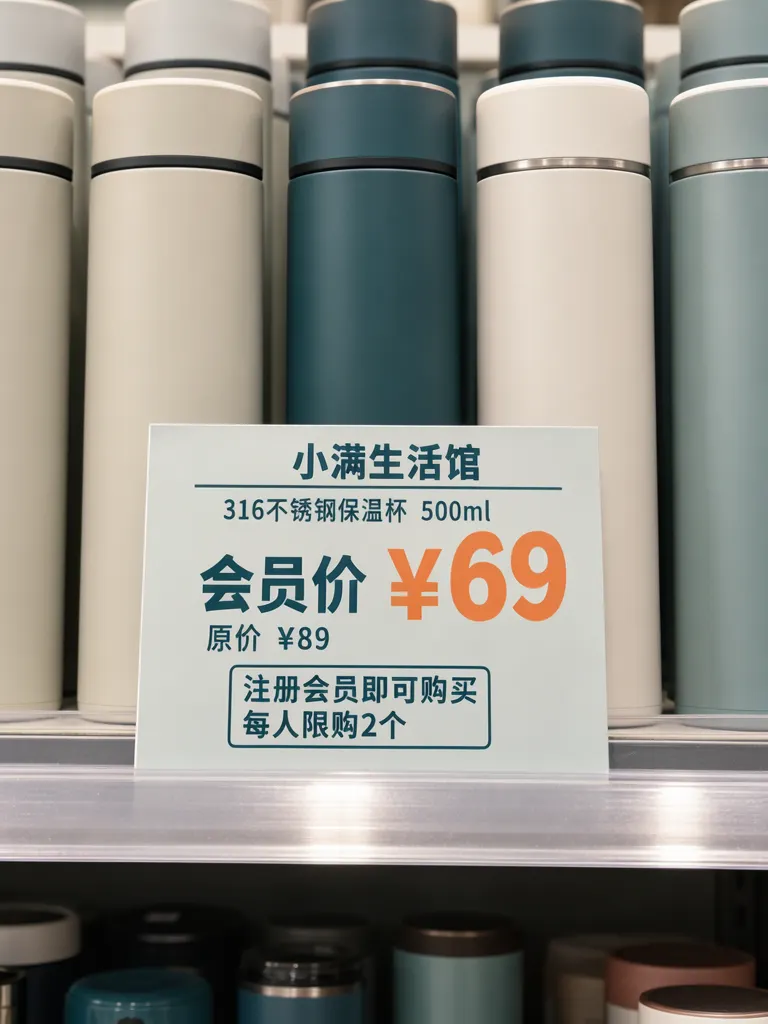
Make one like this Open this image on MOSS Image
Made in prompt mode with this exact prompt:
Photograph of a small printed promotion card on a shop shelf in front of a row of plain matte thermos cups with no logos, bright even light, the card flat and in sharp focus. Light grey card, deep teal and orange type, the member price largest in orange, the two conditions in an outlined box below. The shelf edge is bare: no other price tags, labels or cards anywhere in view. The printed piece holds only the quoted text, and nothing else in view carries any writing: no other signs, labels, stickers or notes. Text, render exactly and add nothing else: small top line '小满生活馆'; product '316不锈钢保温杯 500ml'; price '会员价 ¥69'; line '原价 ¥89'; boxed line '注册会员即可购买'; boxed line '每人限购2个'.
The shared result is our second try. On try one, the card text was right, but a second shelf-edge price tag contained garbled text and “89.” The second prompt specified a bare shelf edge, and the shared image has no extra tag. When a promotion card sits among products, inspect nearby shelf edges and labels too; they can look like part of the offer.
How should you write the conditions?
Use short, specific lines that answer who qualifies, what is limited and when the offer ends. Avoid compressing several rules into a vague footer. If the offer is member-only, say so beside the member price; if the quantity is capped, give that limit in the same conditions group. Keep the product name visible so the rule cannot be mistaken for a different item.
| Offer element | Example wording | Proofing question |
|---|---|---|
| Product | 316不锈钢保温杯 500ml | Is this the exact product and size? |
| Offer | 第二件半价 / 会员价 ¥69 | Does this match the approved promotion? |
| Eligibility | 注册会员即可购买 / 限同款 | Who can use it, and which item qualifies? |
| Limit | 每人限购2个 | Is the quantity limit correct? |
| Period | 活动至12月31日 | Is the end date current and complete? |
A date alone is ambiguous when the offer sells to customers in another time zone. If the deadline decides who gets the price, write the time beside it and name the zone, as our Cyber Monday deadline card does; a printed date with no clock time reads as “all of that day” to one shopper and “already closed” to another.
What should you inspect before sharing the poster?
Read all six text lines and compare each amount, product detail, limit and condition with the source offer. In the photo example, try one added a garbled second price tag; in the layout example, an unrequested strike-through changed the implication of the original price. Those are separate checks: scan the whole scene for extra price labels, then decide whether the price styling accurately describes the product's price history.
Check the condition box at the size customers will see it. A clear offer is not enough if the eligibility or limit is too small to notice. For a product photo, compare the cup shape, colour and material with the item being sold before publishing.
How can you build your own one-product promotion?
- Confirm the exact product name, offer, eligibility, purchase limit and promotion end date before opening the generator.
- For a flat poster, open the Layout Builder at 3:4 and make separate boxes for product, offer, original price and conditions.
- For a shelf photo, use the AI poster generator at 3:4. Quote each line and describe a bare shelf edge so nearby tags do not compete with the offer. The exact-text guide has practical prompt structure advice.
- Check every number and condition, inspect the surrounding scene for other price tags, and use strike-through styling only when it reflects a real previous price.
MOSS Image Studio is an independent hosted studio for the open MOSS-Image model. Not affiliated with OpenMOSS.
FAQ
What should a product promotion poster include?
Show the product, the offer, eligibility, any quantity limit and the promotion period. Keep the conditions grouped with the offer.
Should I cross out the original price?
Only when the product was previously sold at that price. The visual implies a previous price, so verify that detail before using the treatment.
How do I advertise a member price clearly?
Label it as a member price and put the membership requirement beside it. Include other limits, such as a per-person cap, in the same conditions area.
Try it with your own words
Open the Studio, write a brief or lay out boxes on the canvas, and generate with MOSS-Image.