How to design Cyber Monday deadline cards for 2026
Write a clear Cyber Monday deadline with Pacific and Beijing times, a date conversion table, two examples and steps for checking the UTC offset.
Cyber Monday deadline cards for 2026 should state a fixed date, time and time zone. Cyber Monday is Monday, November 30. For the US Pacific deadline used here, November 30 at 11:59 PM PST equals December 1 at 15:59 in Beijing. A static card should show that deadline plainly, without suggesting that its printed numbers are a live countdown.
TL;DR
- Keep the date and time together, with the zone nearby.
- Use PST, UTC−8, for this US Pacific date.
- The Beijing equivalent falls on the following day.
- Check the UTC minus sign and keep the zone readable beside the deadline.
Which time zone applies to this November deadline?
US Pacific standard time applies to this example. The 2026 daylight-saving period ends on November 1; the deadline on November 30 therefore uses PST, UTC−8. Beijing uses UTC+8 without a clock change in 2026. The calculation is 23:59 plus 16 hours, giving 15:59 on December 1.
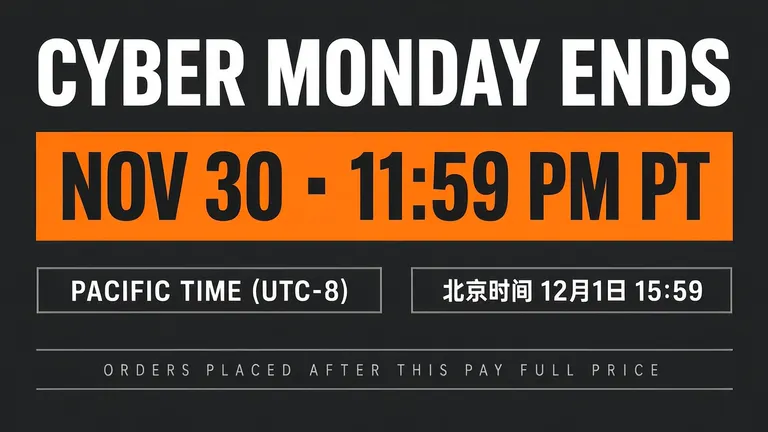
The poster says PT and then spells out “PACIFIC TIME (UTC-8).” For your own campaign, confirm the intended location and offset rather than assuming an abbreviation is enough. Confirm the seller’s end time and what happens to orders placed after it.
The shop, its 11:59 PM deadline and the full-price rule are made up for these examples.
Make one like this Open this image on MOSS Image
Made in the Layout Builder with these boxes:
| Box text / object | Job | Approximate position |
|---|---|---|
| CYBER MONDAY ENDS | Ending headline | Top |
| NOV 30 · 11:59 PM PT | Deadline | Middle |
| PACIFIC TIME (UTC-8) | Pacific zone | Lower left |
| 北京时间 12月1日 15:59 | Equivalent Beijing time | Lower right |
| ORDERS PLACED AFTER THIS PAY FULL PRICE | Order condition | Bottom |
The Chinese box reads “Beijing time, December 1, 15:59.” It is an equivalent instant, not a second deadline for another group of shoppers. Our first banner got the date and time right, but the separator in “NOV 30 · 11:59 PM PT” is a small solid square rather than a round middle dot. The meaning stayed the same, but the punctuation differed from our requested copy; regenerate and check that character if exact punctuation matters. The square card below, made at the same time, prints a round dot.
Why put the Beijing equivalent in a separate box?
It gives a cross-border team a clearly labelled reference without mixing two dates into one sentence. The banner puts the Pacific zone in one box and the Beijing equivalent beside it. Keep the location label attached to each time so a reader does not mistake December 1 for the US sale date.
| Reference | Date | Time | Offset |
|---|---|---|---|
| US Pacific deadline | November 30, 2026 | 11:59 PM / 23:59 | UTC−8 |
| Same instant in Beijing | December 1, 2026 | 15:59 | UTC+8 |
If you change the Pacific hour, recalculate the Beijing box rather than changing only the large orange band. A design with both zones creates two places to proofread. Ask one person to check the source deadline and another to check the conversion.
When is a simpler deadline card enough?
Use the square version when the audience only needs the stated Pacific deadline. It retains the date, hour and explicit offset, while leaving out the Beijing reference and the full-price condition.
Make one like this Open this image on MOSS Image
Made in prompt mode with this exact prompt:
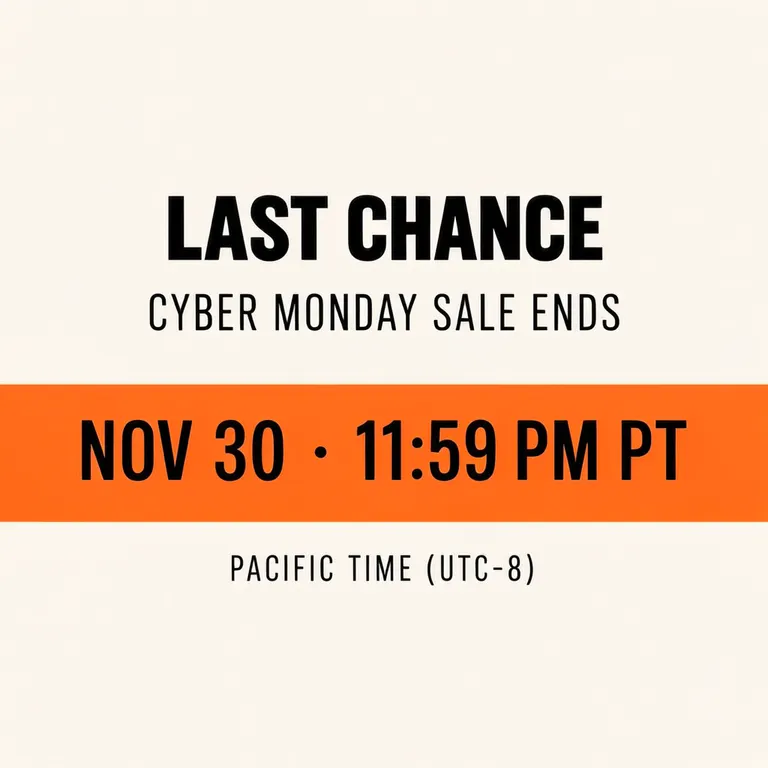
Square deadline card for an online shop's Cyber Monday sale, minimal flat design, warm off-white background, black type, one bright orange band. No clock faces or countdown digits. Text, render exactly and add nothing else: headline 'LAST CHANCE'; line 'CYBER MONDAY SALE ENDS'; large line in the orange band 'NOV 30 · 11:59 PM PT'; small line 'PACIFIC TIME (UTC-8)'.
All four lines were correct on the first attempt, and we got no clock or countdown graphics. The image is a fixed announcement. It does not update as the deadline approaches, so phrases such as “two hours left” would require a separate decision about when and where to publish them.
A stable date-and-time line can be checked directly against the campaign schedule. If you reuse it in several messages, compare every copy before sharing. After the promotion ends, review where the graphic is still visible so an old “LAST CHANCE” card is not left as the only information about the offer.
What should you check before publishing or printing?
Check the day rollover, offset and wording of the deadline. Our banner set the separator as a square instead of a round dot; the time conversion remained correct. New generations may drop characters, so pay particular attention to the minus sign in UTC−8.
Confirm the transaction cut-off with the seller: the banner refers to orders placed, so use “payment completed” only if that is the actual rule. On a print proof, check that the UTC note is readable alongside the large deadline.
How can you build a deadline card for two time zones?
- Start with the seller’s exact deadline and calculate the second zone before opening the tool. Keep November 30 at 23:59 PST and December 1 at 15:59 Beijing together in your working copy for this example.
- Our banner uses 16:9 in the Layout Builder. Draw a headline and large deadline band, two separate lower boxes for Pacific and Beijing time, and a bottom order-condition box.
- For a Pacific-only card, choose 1:1 in the AI poster generator. Quote the four lines shown above, including “PACIFIC TIME (UTC-8)”; the exact-text guide helps keep the offset inside the required copy.
- Check the minus sign, date rollover and time-zone labels first. Read the order condition separately and confirm whether the seller’s cut-off concerns placing an order or completing payment.
MOSS Image Studio is an independent hosted studio for the open MOSS-Image model. Not affiliated with OpenMOSS.
FAQ
Why is the Beijing date December 1?
Beijing is 16 hours ahead of PST for this example. Adding those hours to late evening on November 30 crosses midnight. Keep both the date and the time in the Chinese box.
Should I write PST or PT?
PST names the standard-time offset used here. The sample uses PT with a separate UTC−8 clarification. Confirm the campaign's location and date before choosing either wording for another event.
Can a generated deadline image count down automatically?
This is a static image. Use a written deadline, and do not describe the printed numbers as updating. The square sample intentionally avoids countdown graphics.
Sources
- 2026 occasion dates and weekdays — Checked on 2026-11-03.
- November 1 DST end; Pacific standard time for the deadline — Checked on 2026-11-03.
- Beijing UTC+8 without clock changes in 2026; conversion calculation — Checked on 2026-11-03.
- Los Angeles 2026 time-zone table — Checked on 2026-11-03.
Try it with your own words
Open the Studio, write a brief or lay out boxes on the canvas, and generate with MOSS-Image.