Why Does MOSS-Image SFT Blur the Background? A Report
A user report traces soft SFT backgrounds to early steps and attention outputs. Learn what it found, what remains unknown, and what a hosted studio can do.
MOSS-Image background blur is a question raised by users of the SFT checkpoint. One community report describes soft backgrounds despite deep-focus prompts, then locates the effect in its author's own tests. It does not settle why the effect occurs, whether it is intentional, or how a hosted studio behaves. The useful response is to separate the report from what a poster maker can check and change.
TL;DR
- Hugging Face discussions #9 and #12 raised background blur before issue #35 described measurements on one user's prompts.
- The issue author says the effect is decided in roughly the first 12 steps and is spread across attention outputs in blocks 21–41.
- The report remains unanswered; it does not establish the cause, a fix, or behavior on this hosted studio.
- For a hosted workflow, describe the scene again, simplify the background, and re-roll. A hosted studio cannot apply the reported weight edit.
What did the community report say about SFT backgrounds?
Two earlier Hugging Face discussions by Talanca asked about blur or bokeh in SFT images. Discussion #9 described what looked to its author like deliberate background blur and said prompts had not produced a sharp background. Discussion #12 asked how to avoid blur and wondered whether a mechanism in the original model was responsible; that explanation was posed as a question, not a finding.
Issue #35, opened by jxzd123452 on November 8, 2026, made a more specific report. The author says group photos in front of detailed walls often had soft backgrounds even when prompts asked for deep focus, and that removing people did not remove the softness. In their wording, “f/16, tack sharp, no bokeh” barely helped. They say their prompt family produced a soft background in 12 of 12 images, using their own prompts and measurements.
The report then describes where the author says the effect appeared: roughly the first 12 sampling steps, in background-token states spread across the attention output projections (proj.o) of blocks 21–41. They report that using a sharper condition during steps 0–11 produced most of the effect, while applying it during steps 12–49 did almost nothing. Their described weight edit is their own proposed intervention. These details are a user's account of their experiments, not independently replicated results or an explanation confirmed by OpenMOSS.
The author also lists unsuccessful attempts, including changing negative prompts, emphasizing sharpness words, adjusting individual layers, and using an FP32 VAE decode. That matters for prompt writing: the report does not support a promise that adding “sharp background” or a camera-aperture phrase will fix the result. It says those phrases barely helped in the author's tests.
What can two poster examples show?
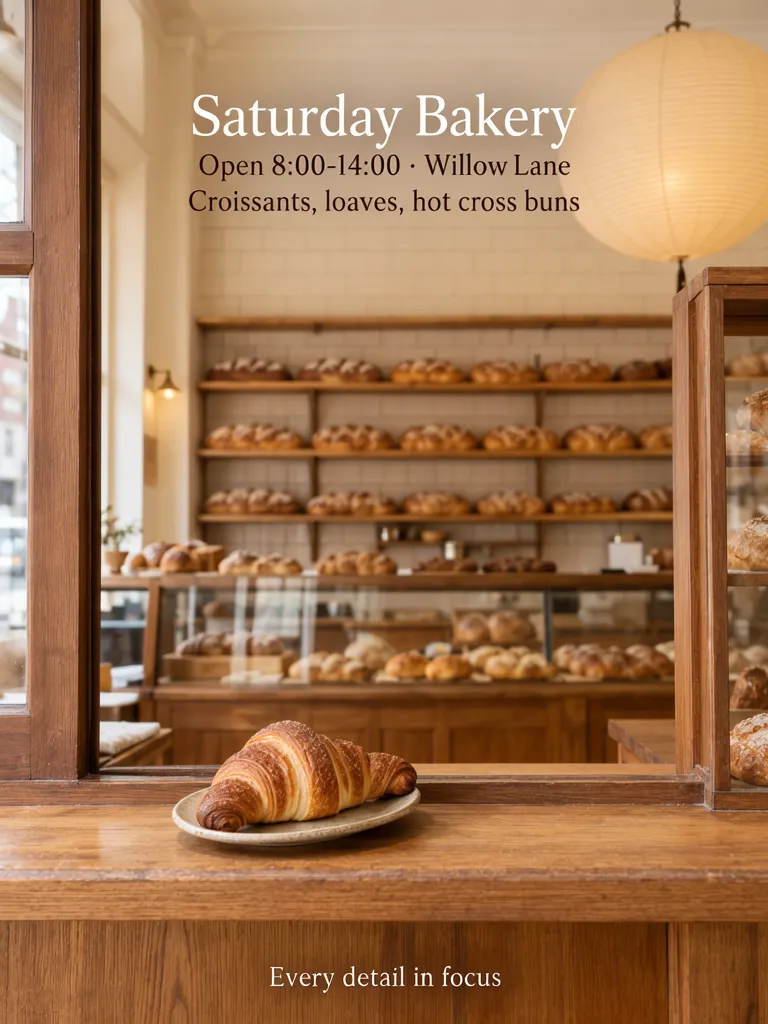
The first example asks for a detailed bakery interior in crisp focus from front to back. Its four copy lines are “Saturday Bakery,” “Open 8:00-14:00 · Willow Lane,” “Croissants, loaves, hot cross buns,” and “Every detail in focus.” The bakery, street, hours, menu and river-run details in these sample images are invented. In this example the interior holds the shelves, tiled wall and lantern, but the background renders soft behind the foreground croissant — the same pattern the report describes.
Make one like this Open this image on MOSS Image
Prompt mode, exact prompt:
A vertical composition in warm cream, oat and soft brown: a wooden bakery counter with one plain croissant on a small plate in the foreground, and behind it a deep, evenly lit bakery interior with a tiled wall, open shelves of unwrapped loaves and a hanging paper lantern with no markings, all in crisp focus from front to back; no labels, packaging text, signs, seals or framed lettering anywhere in the frame. Copy: headline 'Saturday Bakery'; line 'Open 8:00-14:00 · Willow Lane'; line 'Croissants, loaves, hot cross buns'; footer 'Every detail in focus'.
The pair makes a useful distinction: putting detail in a background and asking for a sharp background are separate instructions. A scene can contain shelves and a tiled wall yet still need an explicit focus request. This example names the background objects and asks for front-to-back focus, yet the result still renders the background soft. One image is not a test of the hosted service against the SFT report.
| Brief choice | What it asks for | What to inspect |
|---|---|---|
| Detailed interior | Shelves, tiled wall and lantern, crisp focus front to back | Whether the background details remain visible and sharp |
| Flat-color poster | A flat blue river band, headline, date and footer | There is no photographic depth of field to assess |
The second image is an earlier RIVER RUN poster, reused here: a flat blue band, a headline, a date and a short footer, with no photographic depth of field to judge.

Make one like this Open this image on MOSS Image
Prompt mode, exact prompt:
A minimalist short-copy poster: a broad river band in flat blue across the lower third, one large headline centred above it in black, a single date line under the headline, and a wide cream margin all round. Copy: headline 'RIVER RUN'; line 'December 9'; footer 'Start at the bridge'.
That flat-color image is an opposite extreme, not a cure or counter-test: it has no photographic depth at all. Together, the examples help a reader decide what to ask for in a brief. If the backdrop needs to communicate texture, list the background objects and ask for front-to-back focus. If the backdrop is only a field behind the type, use a simple shape instead of requesting a detailed room.
What can a hosted studio user try?
The reporter describes a weight edit across model layers. A hosted studio does not expose model weights for editing, so the practical choices are smaller: re-describe the scene, choose a simpler background, and re-roll. We cannot tell from these examples whether the hosted provider uses Base, SFT, or a modified checkpoint, and nobody measured this studio for the reported effect. Do not read the bakery image as proof that this service is affected or immune.
For a new attempt, make the background request concrete. Name what should remain visible behind the subject, such as a tiled wall and open shelves, and say whether those objects should remain in focus. If the exact details are not essential, replace a crowded setting with a plain wall or a flat color band. Then inspect the actual output at full size; a prompt is an instruction, not confirmation of the result.
How do you make and check a background-focused poster?
- Write the exact poster copy first, then describe the subject and background as separate parts of the scene.
- Open the AI poster generator and ask for either a detailed environment with front-to-back focus or a simpler field that will sit behind the words.
- Generate a version and inspect the background, not only the foreground subject. Check whether the details you named remain visible and whether their focus matches the brief.
- If the background is too busy or too soft for the message, simplify its description and re-roll. Do not treat “f/16” or “tack sharp” as a guaranteed fix; the issue author says those prompts barely helped in their tests.
- Proofread the copy separately with the exact-text guide. If you want defined text areas, the Layout Builder gives the prompt a box-based layout input.
MOSS Image Studio is an independent hosted studio for the open MOSS-Image model. Not affiliated with OpenMOSS.
Limitations
Issue #35 had zero comments as of November 12, 2026, and OpenMOSS had not replied. The cause is not established; the report does not show that blur is intentional, a bug, or fixed. Its measurements and claimed weight-edit effects belong to one user's prompts and experiments. The hosted examples above do not establish whether this site is affected or unaffected, and a hosted workflow cannot apply that weight edit.
FAQ
Does adding “f/16” remove MOSS-Image background blur?
The issue author says “f/16, tack sharp, no bokeh” barely helped in their tests. The report does not establish a prompt phrase that reliably fixes the effect.
Is the cause of MOSS-Image SFT background blur known?
No. Issue #35 describes where one user says they localized the effect and asks whether it comes from SFT data or aesthetic tuning. The issue had no reply from OpenMOSS as of November 12, 2026, so the cause remains open.
Is MOSS Image Studio affected by the SFT blur report?
That has not been measured here. The report concerns SFT, while the hosted provider's checkpoint choice is not visible from outside. These sample posters are not a measurement of the service.
Sources
- OpenMOSS issue #35: “SFT always blurs the background” (Checked on 2026-11-12).
- Hugging Face discussion #9: “Depth of field, blur, bokeh by default in images” (Checked on 2026-11-12).
- Hugging Face discussion #12: “BLUR everywhere” (Checked on 2026-11-12).
Try it with your own words
Open the Studio, write a brief or lay out boxes on the canvas, and generate with MOSS-Image.