Bakery Sold-Out Signs: What Is Gone and What Is Next
Write bakery sold-out signs that name the item, give the next batch time and separate what remains available, with examples and a practical check list.
A bakery sold-out sign should say which item is gone, when the next batch is expected, and what remains available. Our examples use croissants sold out at 2 PM while pain au chocolat is still available. Give those three facts separate lines so a customer can scan the notice without reading the next-batch time as part of the availability message.
TL;DR
- Name the sold-out item directly.
- Put the next batch time on its own line.
- List remaining items separately from the time.
- Change or remove the sign when the next batch is out; it is a snapshot, not live inventory.
How should a sold-out notice be organized?
Use one clear line for each state: gone, expected next, and still available. The bakery name identifies the source, the sold-out item is the headline, and the next batch time and remaining product each get their own supporting line. That order answers the customer's first question before inviting them to scan what can still be bought.
The bakery name, products and time in these examples are made up.
Make one like this Open this image on MOSS Image
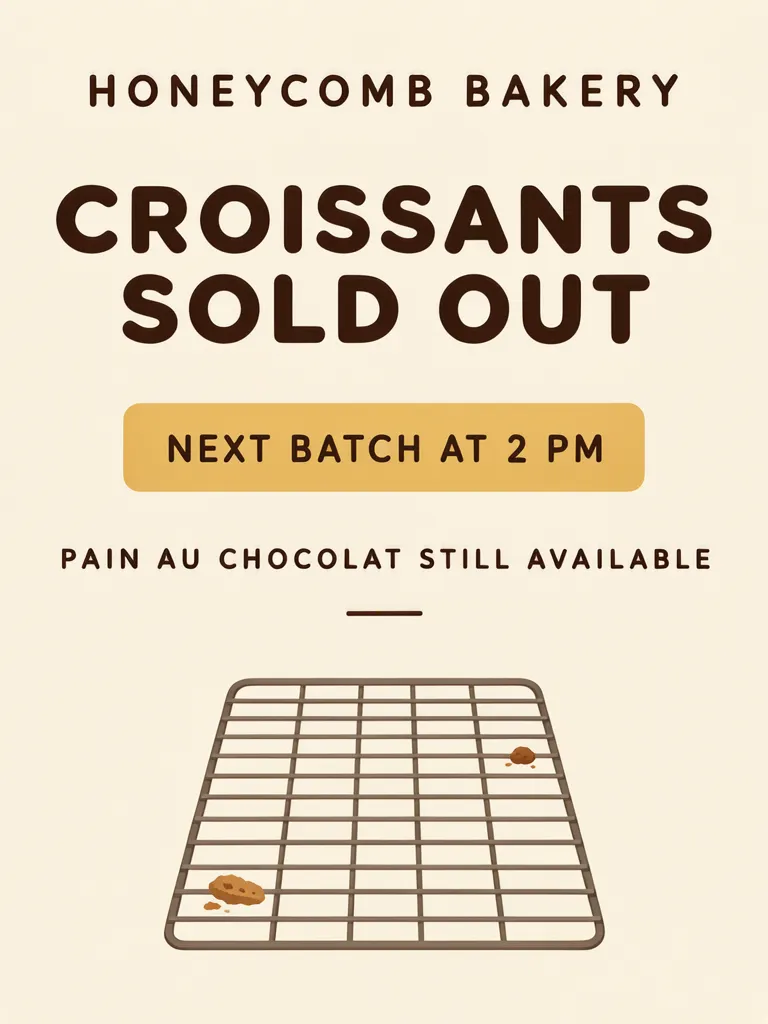
Made in the Layout Builder with these boxes:
| Box text / object | Purpose | Approximate position |
|---|---|---|
| HONEYCOMB BAKERY | Bakery name | Top |
| CROISSANTS SOLD OUT | Main notice | Upper middle |
| NEXT BATCH AT 2 PM | Next batch time | Middle, inside mustard box |
| PAIN AU CHOCOLAT STILL AVAILABLE | Remaining item | Lower middle |
| Empty cooling rack with crumbs | Illustration | Bottom |
All four text lines were correct on the first try. The empty rack and crumbs keep the composition simple while leaving the words to carry the useful information. The Layout Builder makes it possible to assign the time and availability message separate boxes, which is useful when those facts should not read as one unit.
Why should the next batch and remaining item be separate?
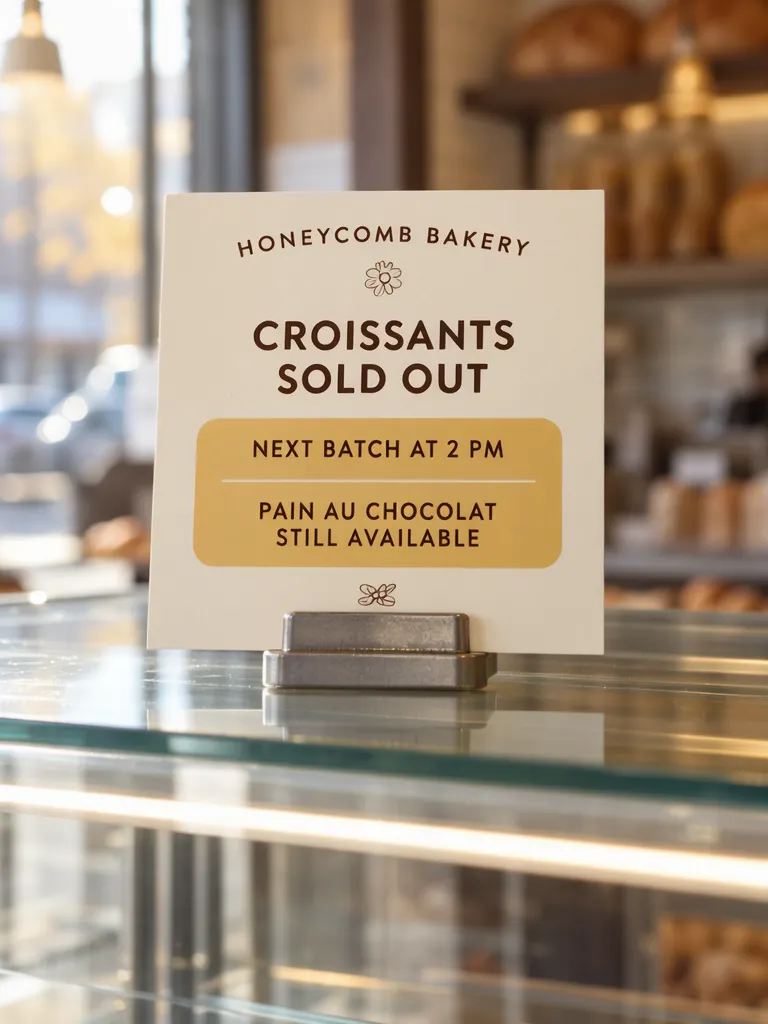
Separate lines make the timing and current choice easier to distinguish. In our photo example, the wording is right, but “PAIN AU CHOCOLAT STILL AVAILABLE” sits inside the same mustard box as “NEXT BATCH AT 2 PM,” divided only by a thin rule. Those are different facts: one tells when an item may return, and the other says what can be bought now. Giving them different boxes or clear spacing reduces that ambiguity.
Make one like this Open this image on MOSS Image
Made in prompt mode with this exact prompt:
Photograph of a small printed card in a metal stand on top of an empty glass bakery display case, morning light, the bakery behind softly blurred, card flat and in sharp focus. Cream card, dark brown type, the next batch time in a rounded mustard box. The case below is empty and has no price tags. The printed piece holds only the quoted text, and nothing else in view carries any writing: no other signs, labels, stickers or notes. Text, render exactly and add nothing else: name 'HONEYCOMB BAKERY'; notice 'CROISSANTS SOLD OUT'; next batch 'NEXT BATCH AT 2 PM'; available 'PAIN AU CHOCOLAT STILL AVAILABLE'.
The first photo try printed the introductory phrase “what is still available” as a small heading above the product line, and pastries appeared in the supposedly empty case. On try 2, we changed the line introductions to short positional words. The extra heading disappeared and the four requested lines were correct. For a similar prompt, keep labels short, such as “headline,” “line,” or “small line,” rather than descriptive phrases that could be mistaken for poster copy.
What should a sold-out sign say when stock changes?
Use wording tied to the moment you put the sign up, then refresh it as the counter changes. A printed or generated sign does not know when a new tray leaves the oven. When the next batch is out, take down the notice or change the availability and timing lines. If another product sells out first, update the item named in the headline rather than leaving a stale claim in view.
| Situation | Useful line | What to update |
|---|---|---|
| Item is gone | CROISSANTS SOLD OUT | Replace with the item currently sold out |
| Another batch is expected | NEXT BATCH AT 2 PM | Change the time if the estimate changes |
| A different item remains | PAIN AU CHOCOLAT STILL AVAILABLE | Remove or replace it when availability changes |
Keep promises modest: “next batch at 2 PM” should reflect the bakery's current plan. If the time is uncertain, use a phrase such as “ASK ABOUT THE NEXT BATCH” instead of presenting a guess as a fixed time.
What should you check before displaying it?
Our shared photo image combines the next-batch and remaining-item lines in one colored box, while the layout image separates them. Before printing or setting out a sign, read each line independently and confirm the named products, timing and current availability with the person managing the counter.
Check that the headline identifies only the product that has sold out. Read the next-batch time at the distance customers will stand, and make sure the 2 PM wording is current. Then look at the “still available” line as a separate statement. A sign can become wrong within minutes, so assign someone to remove or replace it when the batch is ready or stock changes.
How can you make a bakery sold-out sign?
- Choose a 3:4 portrait canvas, as in our two examples. Write the bakery name, sold-out item, next-batch time and remaining item as four separate pieces of copy.
- In the Layout Builder, give the sold-out notice the strongest box, the time its own accent box, and the available item a separate plain line.
- Or use the AI poster generator in prompt mode. Introduce the copy with short positional labels such as “headline,” “line” and “footer”; quote each complete line.
- Check the time and availability against the counter before putting the sign out, then remove it when the next batch is ready. See the JSON layout guide for arranging text in separate boxes.
MOSS Image Studio is an independent hosted studio for the open MOSS-Image model. Not affiliated with OpenMOSS.
FAQ
Should a sold-out sign list what is still available?
It can help customers choose another item. Put remaining products on their own line and update that line when the selection changes.
Should I include a restock time?
Include one when the bakery has a reasonable current estimate. Change the sign if the estimate changes, and take it down once the batch is out.
Can a generated sign show live bakery stock?
No. Treat it as a static notice. A staff member needs to update or remove it as items sell or new batches arrive.
Try it with your own words
Open the Studio, write a brief or lay out boxes on the canvas, and generate with MOSS-Image.