Hiring Poster: How to List the Role, Pay and Shifts
Make a café hiring poster clearer by listing the role, hourly pay basis, exact shift days and times, requirements and application route on separate lines.
A café hiring poster should separate the role, pay basis and shifts so applicants can assess the job before asking for details. Our example is for a part-time barista, lists pay as $17 per hour, and gives Saturday and Sunday shifts from 7 AM to 1 PM. The café, amount and schedule are fictional.
TL;DR
- Put the job title, pay basis and shifts on separate lines.
- State whether pay is hourly, per shift or another basis.
- Include exact days and start and end times.
- Verify the wage terms, tips and schedule with the employer before publishing.
What should a café hiring poster say about pay and shifts?
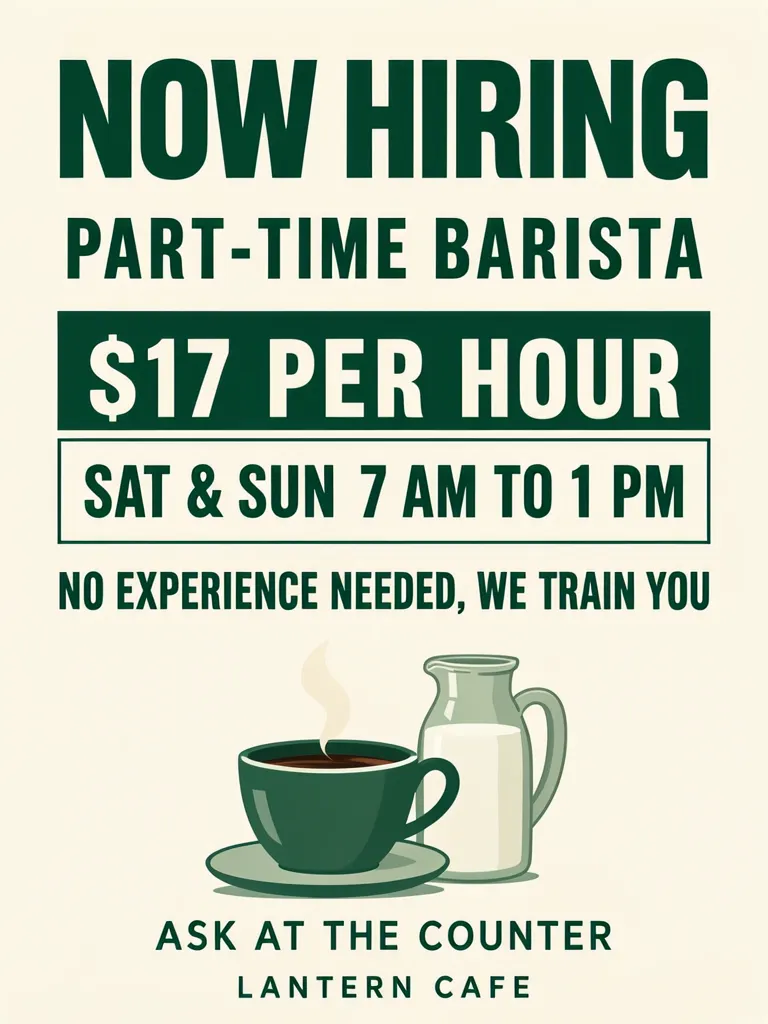
It should name the role, explain how pay is calculated and give the days and hours applicants would work. Our fictional Lantern Cafe sample says “PART-TIME BARISTA,” “$17 PER HOUR,” and “SAT & SUN 7 AM TO 1 PM.” Separate boxes make the pay and schedule easy to locate, while “NO EXPERIENCE NEEDED, WE TRAIN YOU” states the sample’s requirement. The café name, vacancy, pay, schedule and wording are invented for this example.
Make one like this Open this image on MOSS Image
Made in the Layout Builder with these boxes:
| Box text or object | Purpose | Approximate position |
|---|---|---|
| NOW HIRING | Main announcement | Top |
| PART-TIME BARISTA | Role | Upper area |
| $17 PER HOUR | Pay basis and amount | Solid green box |
| SAT & SUN 7 AM TO 1 PM | Shift days and hours | Outlined green box |
| NO EXPERIENCE NEEDED, WE TRAIN YOU | Requirement | Middle |
| Coffee cup and milk jug | Illustration | Lower area |
| ASK AT THE COUNTER | Application instruction | Lower area |
| LANTERN CAFE | Café name | Bottom |
The role, pay and shifts have their own lines, so the applicant can compare them without separating a label from its detail. The amount is explicitly hourly, not a weekly or per-shift total. The shift line includes both days and a start and end time. The hiring method is also visible rather than assumed.
Why give pay and shifts their own lines?
Readers often scan a job notice for the practical terms first. Keeping “$17 PER HOUR” apart from “SAT & SUN 7 AM TO 1 PM” reduces the chance that an amount will look like a shift total or that the days will attach to the wrong detail. This is a layout choice, not a claim about how quickly a vacancy will fill.
Make one like this Open this image on MOSS Image
Made in prompt mode with this exact prompt:
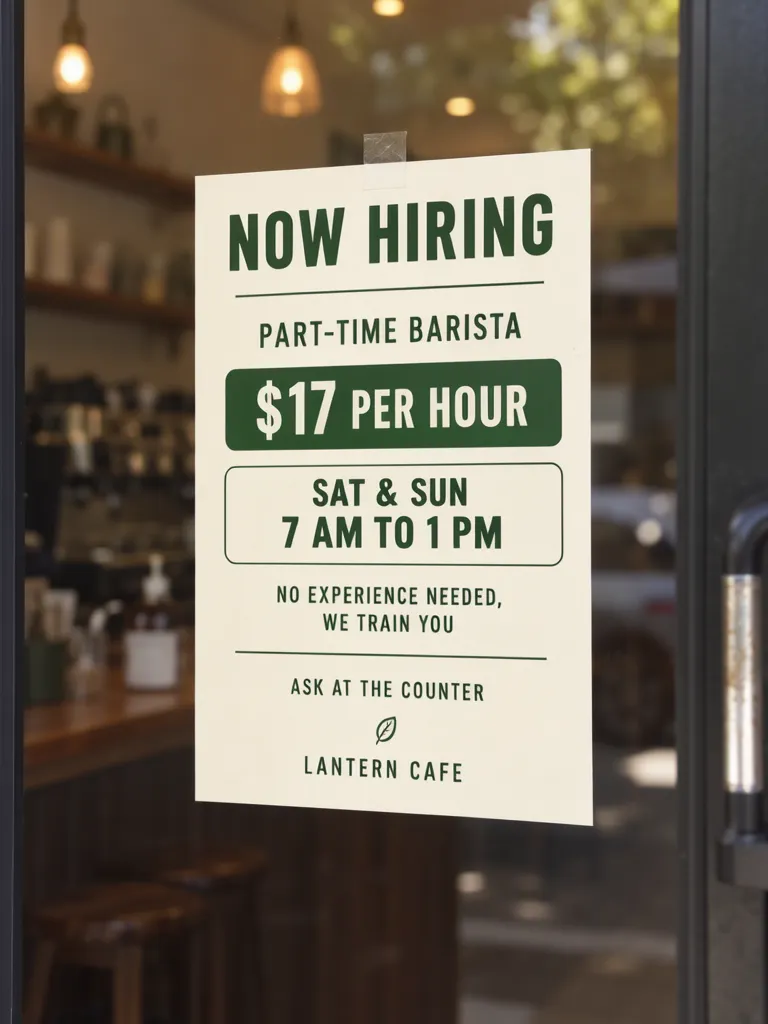
Photograph of a printed hiring notice taped inside the glass door of a small cafe, seen from the street, the counter softly blurred behind, notice flat and in sharp focus. Cream paper, forest green type, the pay in a solid green box and the shifts in an outlined box below it. No opening-hours sticker or other paper on the door. The printed piece holds only the quoted text, and nothing else in view carries any writing: no other signs, labels, stickers or notes. Text, render exactly and add nothing else: headline 'NOW HIRING'; role 'PART-TIME BARISTA'; pay '$17 PER HOUR'; shifts 'SAT & SUN 7 AM TO 1 PM'; requirement 'NO EXPERIENCE NEEDED, WE TRAIN YOU'; apply 'ASK AT THE COUNTER'; name 'LANTERN CAFE'.
Both images worked on their first try. In the photo, the shift and requirement wrap onto two lines and a small leaf mark appears above the café name. The words remain present, but wrapping changes the visual rhythm, and the extra mark is a reminder to inspect details beyond the main message. Use the first image as an example of a separate pay box and outlined shift box, then compare the full wording in the photo version.
What does “pay basis” mean on a hiring notice?
It tells applicants what the number measures. “$17 per hour” describes an hourly rate; a weekly amount, per-shift amount or salary would need its own accurate label. Never show a bare number that could be mistaken for take-home pay, weekly pay or a tip-inclusive amount.
| Hiring detail | Example | Check with the employer |
|---|---|---|
| Role | Part-time barista | Is this the actual position title? |
| Pay | $17 per hour | What pay basis and currency apply? |
| Tips | Not stated | Are tips included, pooled or separate? |
| Shifts | Sat & Sun, 7 AM to 1 PM | Are these the expected days and hours? |
| Experience | No experience needed, we train you | Does training cover the stated expectation? |
The table is a copy checklist, not a set of employment terms. A real employer needs to confirm its local requirements and the wording it can support. In particular, check the relevant local minimum wage before publishing an amount, and clarify whether the figure includes tips. This post does not state a wage law or rate.
What should you proofread before posting the vacancy?
Our layout and photo versions both had all seven required text lines right on the first try. The photo version wrapped the shifts and requirement onto two lines and added a small leaf mark above the café name. Proofread the role, amount, currency, pay basis, days, hours, application method and any experience statement. Check the rendered image at its intended phone or print size, because small marks and line breaks can be easy to miss in a zoomed preview.
Confirm the details with whoever is hiring. If tips vary, avoid implying a guaranteed total; if shifts rotate, describe the schedule accurately rather than presenting one example as fixed. Only include a training promise if the employer actually provides it. Update the poster when the role closes or the terms change.
How can you build a clear café hiring notice?
- Use a 3:4 portrait canvas, as we did for both versions. Prepare the role, pay amount and basis, shift days and times, requirements and application route as separate copy lines.
- In the Layout Builder, create distinct boxes for role, pay and shifts. Give the pay basis room beside the number and put days and hours together in the shift box.
- For a café-door photo, use the AI poster generator. Quote each line and use short labels such as “role,” “pay,” “shifts” and “apply.” Our exact-text guide shows how to check quoted text in generated images.
- Compare the result with employer-confirmed terms, then verify every day and time and inspect any extra marks or line wraps.
MOSS Image Studio is an independent hosted studio for the open MOSS-Image model. Not affiliated with OpenMOSS.
FAQ
Should pay and shift times appear on a hiring poster?
Yes. State the pay basis, workdays and start and end times so applicants can understand the basic terms.
Should a job poster say whether tips are included?
Clarify whether the displayed amount includes tips or whether tips are separate, based on the employer’s actual pay terms.
What if shifts change from week to week?
Describe the schedule as variable and tell applicants how the employer assigns shifts. Do not present one sample shift as a fixed schedule.
Try it with your own words
Open the Studio, write a brief or lay out boxes on the canvas, and generate with MOSS-Image.