Grand Opening Poster Wording: Services, Date and Hours
Plan clear grand opening poster wording with a shop name, accurate service categories, a checked opening date and separate regular hours people can scan.
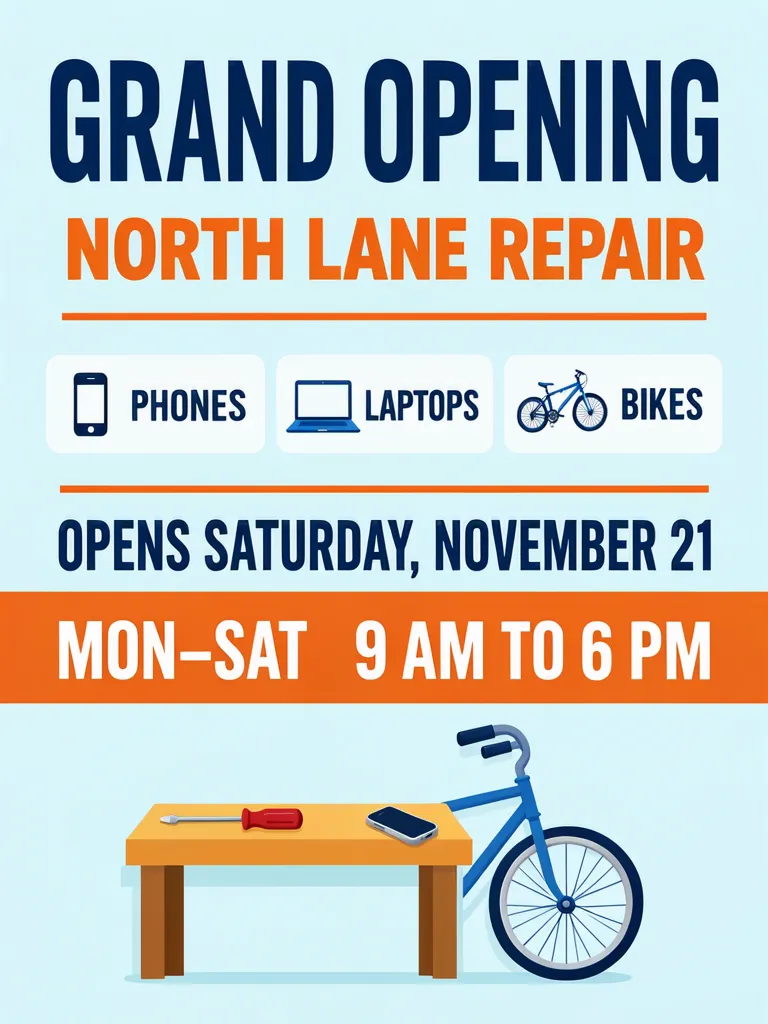
A grand opening poster should tell people the shop name, a few service categories, the opening date and the hours in a clear reading order. Our repair-shop example uses three service boxes and says it opens Saturday, November 21, 2026. Put the date and the hours on separate lines so a passerby can quickly see when the new shop opens and when it is normally open.
TL;DR
- Keep the shop name, opening date and weekly hours distinct.
- Use a short, accurate list of service categories.
- Give date and hours their own lines or boxes.
- Check every service label and the hours at the size people will see them.
What should a grand opening poster say?
Start with the name and opening date, then give only the service categories a customer can actually ask about and the hours they can visit. In our sample, NORTH LANE REPAIR offers PHONES, LAPTOPS and BIKES, opens Saturday, November 21, and lists Monday to Saturday, 9 AM to 6 PM. The shop and its details are fictional. The date falls on a Saturday according to the November 2026 calendar.
Make one like this Open this image on MOSS Image
Made in the Layout Builder with these boxes:
| Box text or object | Purpose | Approximate position |
|---|---|---|
| GRAND OPENING | Main announcement | Top |
| NORTH LANE REPAIR | Shop name | Upper area |
| PHONES | Service category | First white box |
| LAPTOPS | Service category | Second white box |
| BIKES | Service category | Third white box |
| OPENS SATURDAY, NOVEMBER 21 | Opening date | Lower middle |
| MON–SAT 9 AM TO 6 PM | Hours | Orange band |
| Workbench, screwdriver, phone and bicycle wheel | Illustration | Bottom |
The three white service boxes are separate, one per category. The opening date and hours each have a clear place, so the reader does not have to infer whether the hours describe the opening event or the shop’s regular schedule. The hours band also gives the time a different visual treatment from the one-day opening date.
How do you keep service labels matched to the right categories?
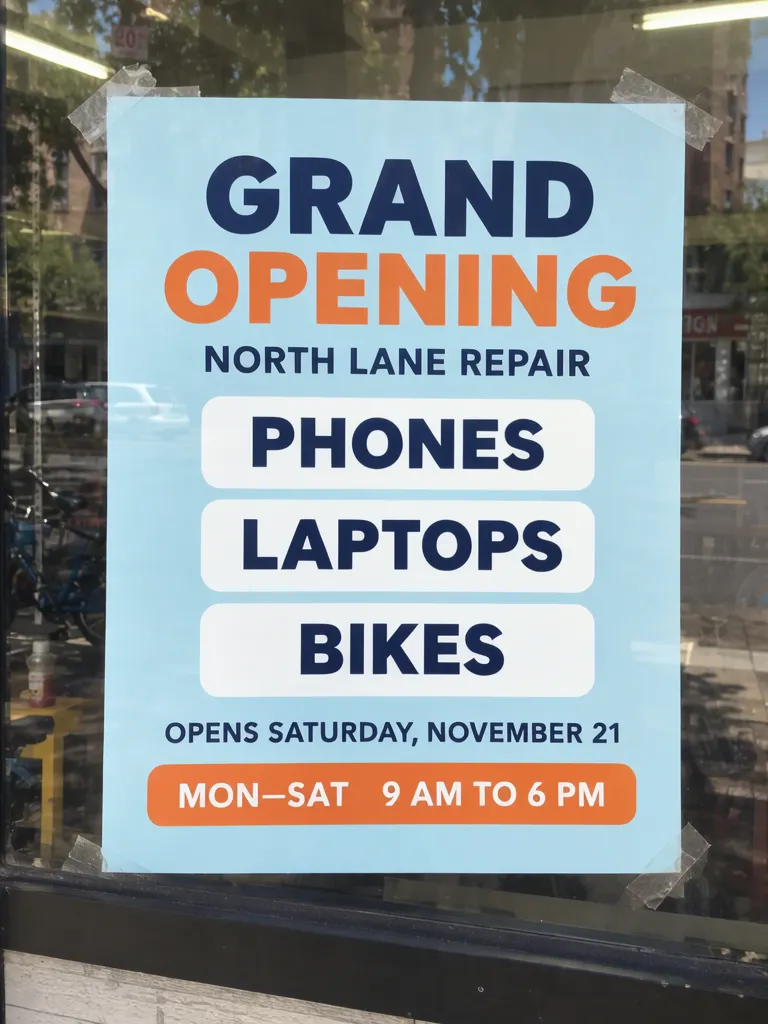
Use short category names and give each one its own box. The photo version places PHONES, LAPTOPS and BIKES in three stacked white boxes. But its first try put a bicycle in the LAPTOPS box and an old telephone handset in PHONES. A second try explicitly asked for each box to hold only its word and no icon, but icons returned. On try 3, the shared image, we changed how each line was introduced to short positional labels. The three service boxes then appeared without icons. The instruction against icons alone did not remove them; changing the line labels did.
Make one like this Open this image on MOSS Image
Made in prompt mode with this exact prompt:
Photograph of a printed grand opening poster taped inside the front window of a small repair shop, the street reflected faintly, poster flat and in sharp focus. Pale blue poster, navy and orange type, the three services in rounded white boxes, each box holding only its word with no icon or picture, the hours on one line in an orange band. The printed piece holds only the quoted text, and nothing else in view carries any writing: no other signs, labels, stickers or notes. Text, render exactly and add nothing else: headline 'GRAND OPENING'; line 'NORTH LANE REPAIR'; box 'PHONES'; box 'LAPTOPS'; box 'BIKES'; line 'OPENS SATURDAY, NOVEMBER 21'; line in the orange band 'MON–SAT 9 AM TO 6 PM'.
The shared photo is try 3. The first two tries had all required words, but the first assigned the wrong icons and wrapped the hours, while the second brought icons back and moved the hours from the orange band. The third kept the services in stacked boxes and the hours together on one line. The street reflection includes part of a red sign, which is in the window reflection rather than on the poster.
How should you arrange the date and opening hours?
Give the opening date and recurring hours separate lines. “Opens Saturday, November 21” describes the first day; “Mon–Sat, 9 AM to 6 PM” describes the weekly schedule. If the opening event has different hours from normal service, name them separately, for example “Opening event: 10 AM–2 PM” and “Regular hours: Mon–Sat, 9 AM–6 PM.” That distinction prevents a reader from treating event hours as the lasting schedule.
| Information | Example line | Reader’s question answered |
|---|---|---|
| Opening date | OPENS SATURDAY, NOVEMBER 21 | When does the shop open? |
| Regular hours | MON–SAT 9 AM TO 6 PM | When can I visit afterward? |
| Services | PHONES · LAPTOPS · BIKES | What can I bring here? |
Use the weekday only after checking the date against a calendar, and spell out a month if the audience could read a numeric date in more than one order. For hours, include AM or PM and avoid relying on a clock illustration to supply missing detail. If Sunday is closed, say so only if that information helps customers plan; do not make them guess from a list that happens to end on Saturday.
What should you check before displaying the poster?
Our first photo try paired the wrong icons with two categories, and the hours shifted across retries; the third photo try fixed the boxes and kept the hours on one line. Before printing, compare the shop name, every service, weekday, date, dash and AM/PM marker with the approved copy. Zoom into each icon and make sure it supports rather than contradicts its label. Read the hours aloud as a customer would, then check them in a phone-sized preview and on a print proof. The shared image has a reflected red sign in the window; inspect reflections and surrounding objects if you plan to use a photographed setting.
A poster is a dated announcement, not a live schedule. If the opening date passes or the hours change, take it down or replace it. Do not leave an old opening notice in the window where people may mistake it for current information.
How can you make a clear grand opening poster?
- Choose a 3:4 portrait canvas, as in both examples. Draft a short shop name, the real opening date, regular hours and only a few service categories.
- In the Layout Builder, make one box for the headline, one for the name, three separate category boxes, one date line and one hours band. Add an illustration after the essential information has room.
- For a window-photo treatment, use the AI poster generator. Introduce copy with positional terms such as “headline,” “line” and “small line,” and keep the exact text inside quotes. Our exact-text guide covers keeping requested copy distinct from scene description.
- Verify the date and hours before generation, then compare each rendered line with the final shop information. Check whether the service icons match the labels and review the whole poster at its display size.
MOSS Image Studio is an independent hosted studio for the open MOSS-Image model. Not affiliated with OpenMOSS.
FAQ
What belongs on a grand opening poster?
Include the shop name, opening date, a few accurate services, regular hours and a clear way to visit or contact the shop if needed.
Should opening-day hours and regular hours be separate?
Yes, when they differ. Label each schedule so customers can tell whether a time applies only to the event or to future visits.
How many services should I list?
List the main categories customers need to recognize. Keep each label short and separate so it remains readable.
Sources
- November 2026 calendar — Checked on 2026-11-03.
Try it with your own words
Open the Studio, write a brief or lay out boxes on the canvas, and generate with MOSS-Image.