How to Design Exam Revision Reminder Cards That Stay Clear
Plan a revision card with weekly tasks, a rest reminder and a school-date note. Compare layout and photo approaches, then proofread it.
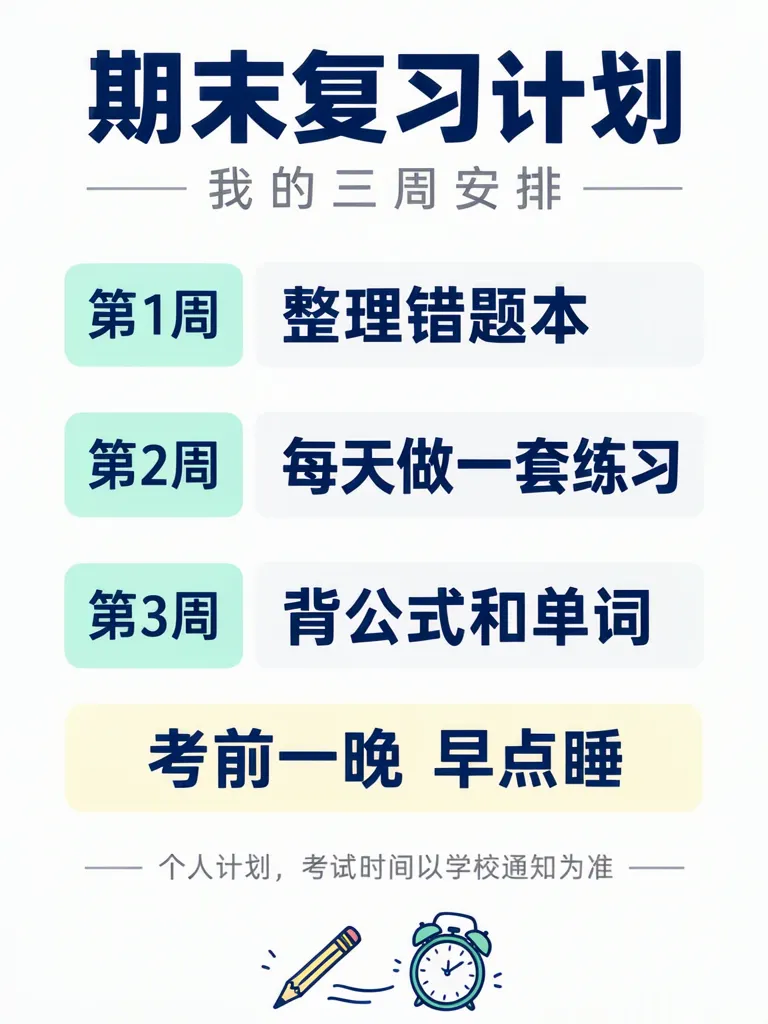
An exam revision reminder card is a personal checklist that breaks preparation into a few manageable tasks. This example uses a three-week plan, a short instruction for the night before, and a note that the schedule is personal. It can help turn a broad goal such as “revise for exams” into a sequence you can adjust to your own subjects and school notices.
TL;DR
- Give each week one task that you can recognize at a glance.
- Keep the night-before reminder separate from revision work.
- Label a personal plan clearly and confirm exam dates with your school.
- Check every line in the generated image before sharing it.
What belongs on a personal revision reminder card?
Use a title, a time span, a small number of concrete tasks, and a note about where the schedule comes from. Our example says “期末复习计划” (end-of-term revision plan) and “我的三周安排” (my three-week plan). Its rows pair “第1周” with “整理错题本” (organize the error notebook), “第2周” with “每天做一套练习” (complete one practice set each day), and “第3周” with “背公式和单词” (memorize formulas and vocabulary). A separate box says “考前一晚 早点睡” (go to bed early the night before the exam).
The last small line reads “个人计划,考试时间以学校通知为准”: this is a personal plan, and exam dates should follow the school’s notice. That distinction matters because the card is a study aid, not a source for the school's timetable. The example’s tasks and wording are invented for demonstration; adapt them to your subjects and actual schedule.
Make one like this Open this image on MOSS Image
Made in the Layout Builder with these boxes:
| Box text / object | Job | Approximate position |
|---|---|---|
| 期末复习计划 | Main title | Top |
| 我的三周安排 | Subtitle | Below title |
| 第1周 / 整理错题本 | First week and task | Upper middle |
| 第2周 / 每天做一套练习 | Second week and task | Middle |
| 第3周 / 背公式和单词 | Third week and task | Lower middle |
| 考前一晚 早点睡 | Rest reminder | Pale yellow box near bottom |
| 个人计划,考试时间以学校通知为准 | Schedule note | Bottom |
| Pencil and alarm clock | Small illustration | Bottom area |
All ten required lines were correct on the first try. The week tabs sit beside their tasks, and the sleep reminder has a separate colored box. The layout gives each text item a place to belong, which makes the weekly sequence easy to scan.
How does the photo version compare with the layout?
The second image puts the same card on a wall above a study desk. Its notebook and pencil cup have no writing, and all ten lines were correct on the first try. The title, three weekly rows, sleep reminder, and personal-plan note stay together on one printed card.
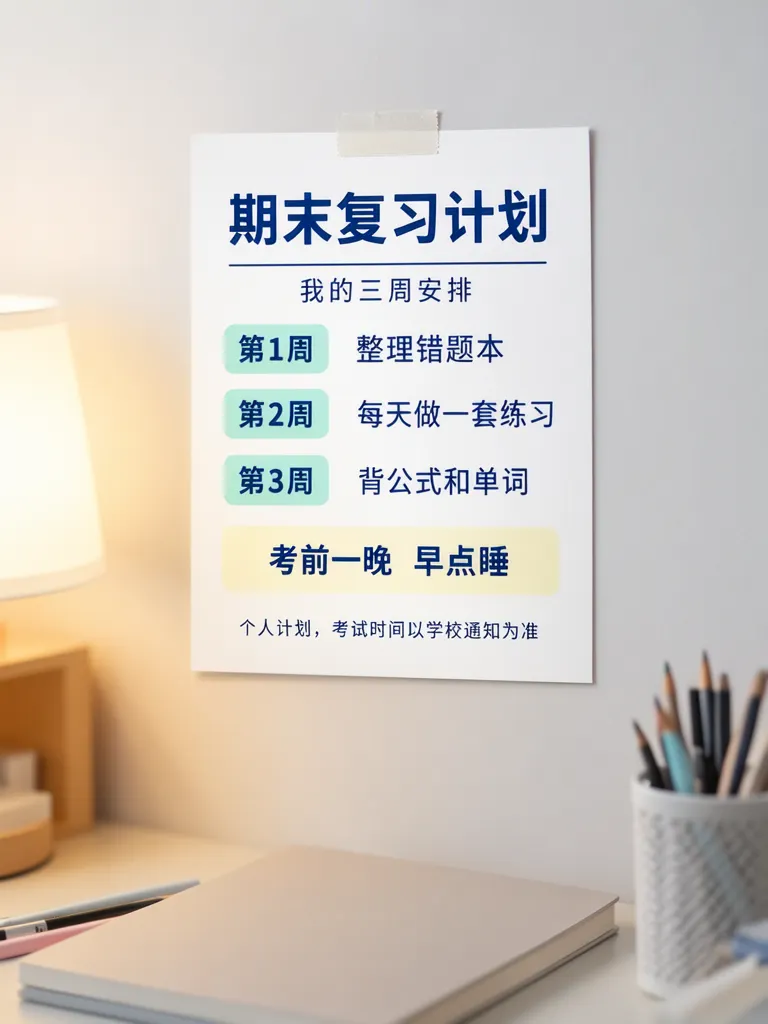
Make one like this Open this image on MOSS Image
Made in prompt mode with this exact prompt:
Photograph of a printed revision reminder card taped alone to a plain light wall above a study desk, a closed plain notebook and a pencil cup below, soft lamp light, the card flat and in sharp focus. White card, dark blue type, three rows each with a small mint tab for the week and the task beside it, the sleep reminder in a pale yellow box. The notebook and pencil cup carry no writing. The printed piece holds only the quoted text, and nothing else in view carries any writing: no other signs, labels, stickers or notes. Text, render exactly and add nothing else: title '期末复习计划'; subtitle '我的三周安排'; tab '第1周'; task '整理错题本'; tab '第2周'; task '每天做一套练习'; tab '第3周'; task '背公式和单词'; boxed line '考前一晚 早点睡'; small note '个人计划,考试时间以学校通知为准'.
The two approaches serve slightly different purposes. A layout is useful when you already know how to divide the card into rows and boxes. A written scene prompt is useful when the setting around the card is part of the image you want. In either case, the output is an image; the task order and schedule still need to come from you.
| Approach | What you specify | Useful when |
|---|---|---|
| Layout Builder | Separate title, subtitle, week labels, tasks, reminder and note boxes | The order and grouping of the checklist matter most |
| Written prompt | Card style, desk setting, row arrangement and exact quoted lines | You want a contextual photo-like scene around the card |
What should you check before using the card?
Both versions got the required copy right on their first tries, but that does not remove the need to proofread. Compare every label with your own plan, especially week numbers and tasks that may look similar when reduced. Check that the note still says the schedule is personal and directs readers to the school’s notice for exam dates. If a card will be printed, inspect it at the size you plan to use; the small bottom note deserves a separate look.
Do not copy the three-week example as a school timetable. Replace it with your own dates only after confirming them with the school, then check the final image against that confirmed information. Leave enough room for longer subject names instead of squeezing them into a short line.
How can you make a reminder card for your own subjects?
- Write the tasks first, grouping them by week or another time block that fits your revision plan. Keep each task short enough to read in one glance.
- Choose a portrait canvas as in these 3:4 examples. Use the Layout Builder to make one box for each week label and its task, plus separate boxes for rest and the schedule note.
- For a desk scene, use the AI poster generator and quote each line exactly. Describe the card and the surrounding objects separately so the notebook or pencil cup does not become part of the checklist.
- Compare the output line by line with your plan, then check the smallest note at the intended viewing size. The exact-text guide covers practical ways to keep quoted lines distinct.
MOSS Image Studio is an independent hosted studio for the open MOSS-Image model. Not affiliated with OpenMOSS.
FAQ
What should a revision reminder card include?
Include a short title, a few specific tasks, and a time frame. Add a personal-plan note if readers could mistake it for a school notice.
Should I put exam dates on the card?
You can include dates after confirming them with your school. If the card will be reused or shared, make clear where the schedule should be verified.
How many tasks should go in each week?
Choose only as many as you can read and act on easily. This example uses one visible task per week; your plan can use more if the text remains legible.
Can a reminder card replace the school's exam notice?
No. It is a personal study aid. Follow the current notice from your school for exam dates and arrangements.
Try it with your own words
Open the Studio, write a brief or lay out boxes on the canvas, and generate with MOSS-Image.