A Practical Guide to Readable WeChat Article Cover Headlines
Plan a readable WeChat article cover with a short headline, supporting line and clear artwork, then check the uploaded draft in the publishing preview.
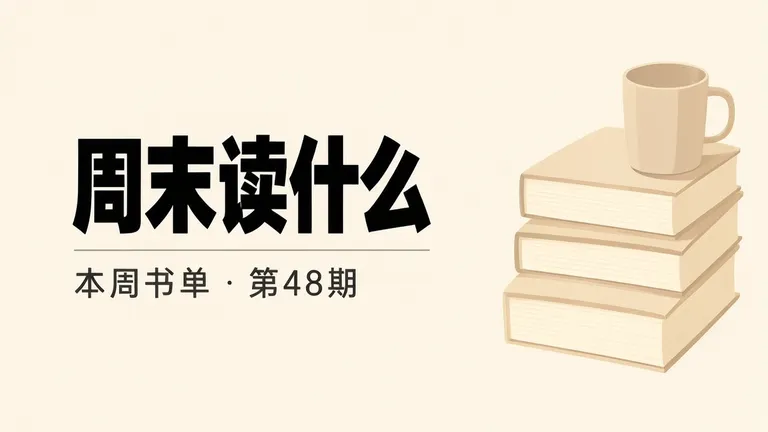
A WeChat article cover needs a headline that remains easy to read when readers see it in a preview. We made two fictional landscape examples: a book-list cover with a short headline on the left and a shop-news cover with a winter bouquet on the right. Both source images are 1280 × 720, but we did not test their crop in the WeChat publishing preview, so upload a draft and inspect it there before publishing.
TL;DR
- Keep the main headline short and give it clear space.
- Put secondary wording below or beside the headline, not through it.
- Treat the generated dimensions as the file dimensions, not proof of how a preview crops it.
- Upload a draft and inspect the cover in the publishing app’s own preview.
What makes a cover headline readable?
Use one short line as the visual anchor and keep supporting text secondary. In the first example, “周末读什么” means “What to read this weekend”; the smaller line “本周书单 · 第48期” means “This week’s reading list · Issue 48.” The book illustration sits to the right, leaving the large headline at center-left. The newsletter title and issue details are invented examples.
Make one like this Open this image on MOSS Image
Made in the Layout Builder with these boxes:
| Box text or object | Purpose | Approximate position |
|---|---|---|
| 周末读什么 | Main headline | Center-left |
| 本周书单 · 第48期 | Issue line | Below headline, left |
| Plain books and mug illustration | Cover artwork | Right |
Both lines were right on the first try. The layout gives the headline a large dedicated box, while the smaller issue line sits below it. This kind of hierarchy helps readers find the topic before the supporting detail. For your own cover, shorten a headline until it fits comfortably, then make the secondary line smaller and less prominent. Do not pack several announcements into the same title area.
How can a shop-news cover keep its subject clear?
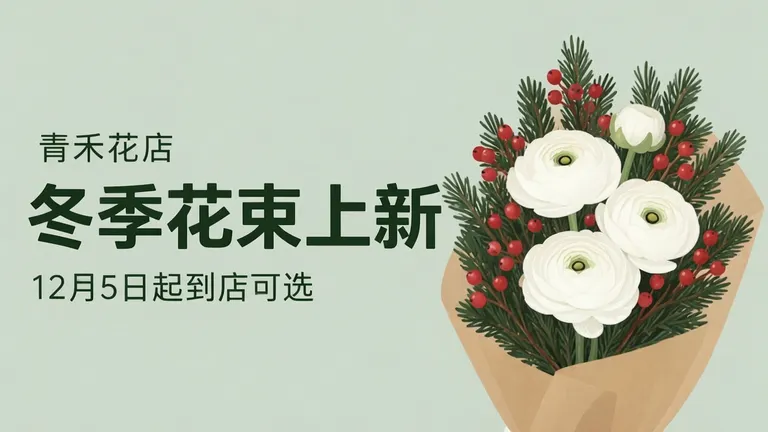
Give the subject and headline separate areas, then keep any date or availability line concise. Our second example uses a winter bouquet on the right and places the words on the left: “青禾花店” means “Green Grain Flower Shop,” “冬季花束上新” means “Winter bouquets now available,” and “12月5日起到店可选” means “Available to choose in store from December 5.” The shop and date are invented. The prompt version’s three lines were right on the first try, with the bouquet on the right and headline in the left half.
Make one like this Open this image on MOSS Image
Made in prompt mode with this exact prompt:
Landscape article cover image, soft flat illustration of a winter bouquet of white ranunculus, pine sprigs and red berries wrapped in plain kraft paper on the right, a pale sage background, the headline large and heavy in dark green on the left half, the other lines smaller below it. The poster holds only the quoted text: no logo, no signature and no other words. Text, render exactly and add nothing else: small top line '青禾花店'; headline '冬季花束上新'; line '12月5日起到店可选'.
A date or issue number can be useful, but it competes with the headline if it is equally large. Decide what a reader should understand first, then size and position the supporting line accordingly. In a cover with several words, test the title on a phone-sized preview; long text can feel balanced at full size and crowded when reduced.
| Cover element | Example | Reading order |
|---|---|---|
| Main headline | 周末读什么 | First, largest |
| Supporting line | 本周书单 · 第48期 | Second, smaller |
| Artwork | Books and mug | Visual context beside text |
| Shop headline | 冬季花束上新 | Main phrase |
| Availability | 12月5日起到店可选 | Supporting detail |
The two examples are landscape files, but dimensions alone do not tell you how the actual publishing interface will show a cover. We did not verify a WeChat ratio or crop rule from a primary source, and the crop was not tested. The generated images are 1280 × 720. Upload the draft where you intend to publish it and check the app preview, particularly whether the edges, headline and supporting line remain visible. The JSON layout guide describes using separate boxes to position headline and smaller copy.
What should you check in the publishing preview?
Check the image in the actual app preview, not only in a desktop editor or on the image share page. Confirm the headline survives the preview crop, the secondary line stays legible, and the illustration does not cover any text. The book-cover example places the title in the left-center, while the flower cover keeps its wording in the left half; those are useful starting layouts, not a tested crop guarantee.
Also read the text at the displayed size. A cover may look clear when enlarged while its subtitle becomes difficult to scan as a small preview. If the headline is too long, cut a phrase or split the thought into a shorter main title and a compact subtitle. Keep essential publication information away from the outer edges until you have checked how the target preview frames it.
How do you create a WeChat article cover?
- In the Layout Builder, choose a landscape canvas and reserve a large box for a short headline, with secondary copy in its own smaller box.
- Keep artwork on the opposite side from the headline and avoid placing important words over detailed imagery.
- For an illustrated cover, use the AI poster generator and quote every line exactly; specify which line is the headline and which is supporting copy.
- Upload a draft and inspect it in the publishing app’s preview. The JSON layout guide shows how separate boxes can express this hierarchy.
MOSS Image Studio is an independent hosted studio for the open MOSS-Image model. Not affiliated with OpenMOSS.
FAQ
How long should a WeChat article cover headline be?
Keep it short enough to read quickly in the preview. Use a subtitle for supporting context instead of shrinking a long headline into the same space.
How do I check a WeChat cover crop?
Upload a draft and inspect it in the publishing interface’s own preview. Check that the headline, secondary text and important artwork remain visible.
Should a WeChat article cover include a subtitle?
Include one when it adds useful context, such as an issue number or availability detail. Give it less visual weight than the main headline.
What size should a WeChat article cover be?
Use the current requirements shown in the publishing interface and check the uploaded preview. Do not infer a crop rule from the dimensions of a generated example.
Try it with your own words
Open the Studio, write a brief or lay out boxes on the canvas, and generate with MOSS-Image.