AI menu item and price swaps: check every menu pairing
Compare a boxed three-row menu with a written prompt version, see what changed in the layout, and follow a practical dish-by-dish price check.
An AI menu can spell every dish and price correctly yet still place a price beside the wrong item. Both of our test menus came out right, so this post shows how to check yours: read each dish and its price as one pair. A Layout Builder image gives every dish and price its own row; the written-prompt version added unrequested pictures, split the shop name, and wrapped one dish name, making the line-to-price relationship harder to scan.
TL;DR
- Treat each dish name and price as one unit when proofreading.
- Give every menu row its own region in a layout.
- If a name wraps, trace its row to the price before approving.
- Check the final menu at the size customers will read it.
Why can a correct price appear to belong to the wrong dish?
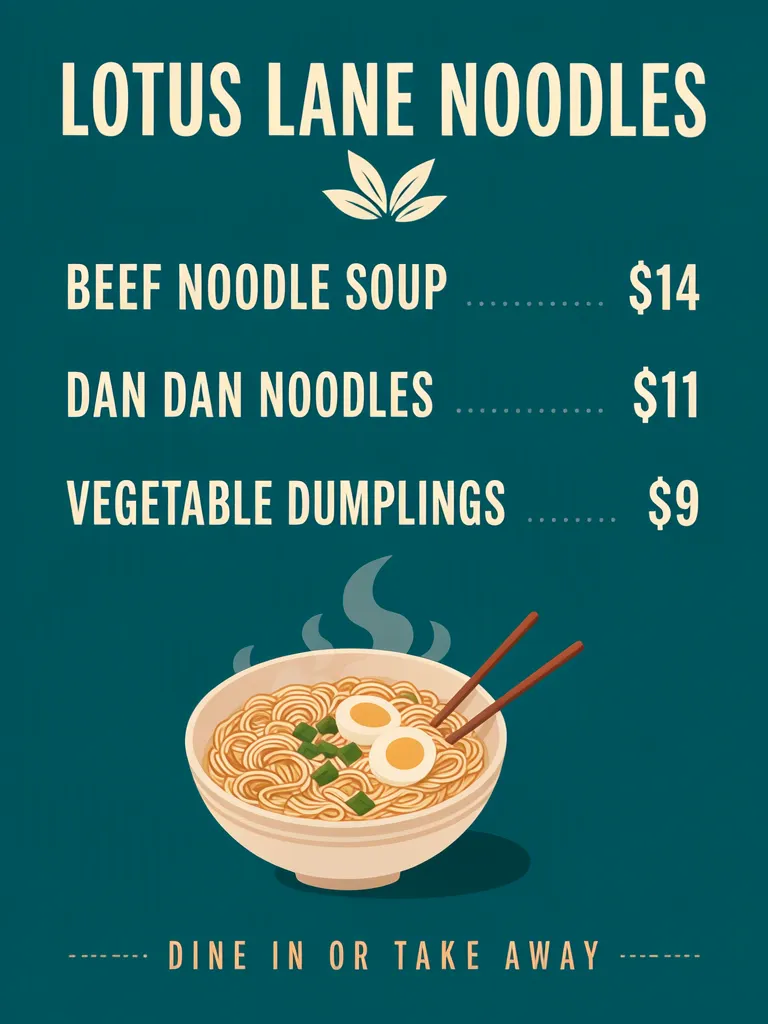
Spelling can be perfect and the pairing still wrong. Our three-item example lists BEEF NOODLE SOUP $14, DAN DAN NOODLES $11, and VEGETABLE DUMPLINGS $9. The shop name and prices are fictional. The layout version places each dish and price together in a separate horizontal region.
Make one like this Open this image on MOSS Image
Made in the Layout Builder with these boxes:
| Box text or object | Purpose | Rough position |
|---|---|---|
| LOTUS LANE NOODLES | Shop name | Top |
| BEEF NOODLE SOUP $14 | Dish–price row | Upper middle |
| DAN DAN NOODLES $11 | Dish–price row | Middle |
| VEGETABLE DUMPLINGS $9 | Dish–price row | Lower middle |
| Noodle bowl illustration | Decoration | Bottom |
| DINE IN OR TAKE AWAY | Service note | Footer |
All five required lines were correct on the first try, and each dish and price occupied one row in its box. That structure makes it easier to trace a line from the dish to its amount. The amount itself is only useful if the customer can tell what it applies to.
What changes when the same menu is written as a prompt?
The prices stayed with their correct dishes in our prompt-mode result, but the composition added small pictures beside dishes, split the shop name across two lines, and wrapped one dish name. A wrap creates a visual break: the eye may follow the second part of the dish name separately, while its price remains at the end of the row.
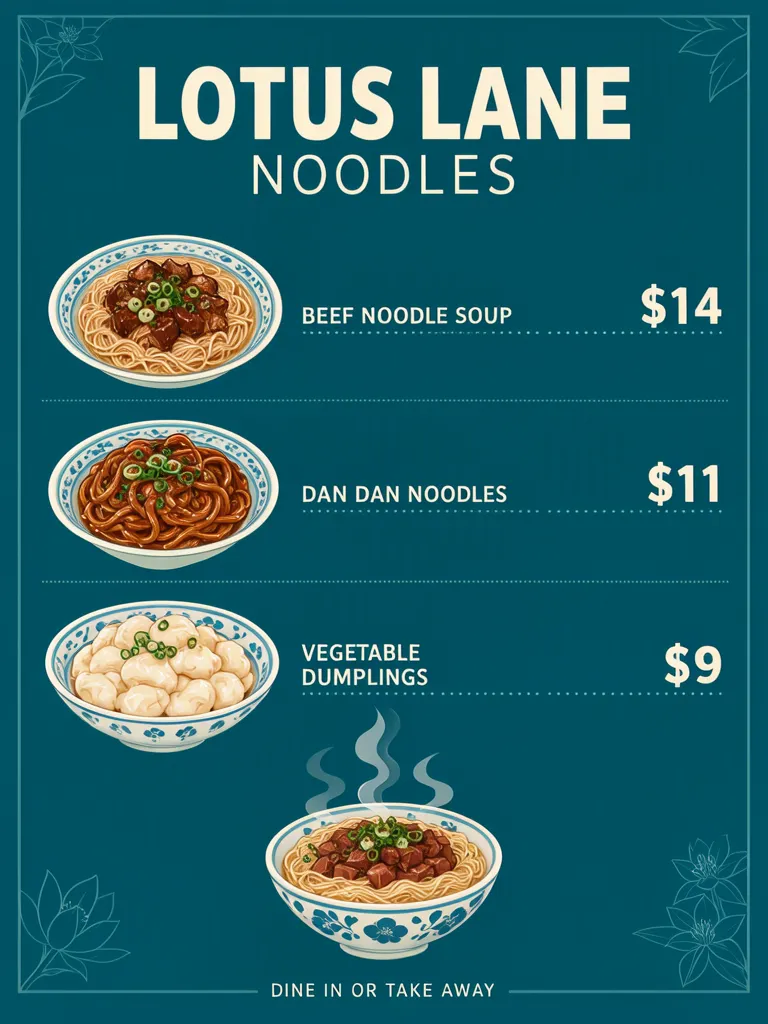
Make one like this Open this image on MOSS Image
Made in prompt mode with this exact prompt:
Noodle shop menu poster, flat design on deep teal, cream type, three dish rows each with its own price, thin dotted leaders between dish and price, a steaming noodle bowl illustration at the bottom. Text, render exactly and add nothing else: name 'LOTUS LANE NOODLES'; row 'BEEF NOODLE SOUP $14'; row 'DAN DAN NOODLES $11'; row 'VEGETABLE DUMPLINGS $9'; footer 'DINE IN OR TAKE AWAY'.
Although the required prices remained correctly associated in this test, the added visual elements and wrapped line made the menu less predictable to scan. If a written prompt is the right starting point, specify a fixed row structure and then inspect where each price sits relative to its full dish name. The AI poster generator accepts a written scene and copy; the Layout Builder guide explains box-based placement.
Ideogram’s text-in-images guide also recommends describing where text should sit, and its JSON format lets each text element have its own box. We did not test Ideogram for this post.
How should a menu row connect a dish and its price?
Keep the name and amount visually tied within a single row. A table is useful both in your source copy and in the finished menu because it exposes pairings before decoration is added.
| Dish | Sample price | Proofread as a pair |
|---|---|---|
| Beef noodle soup | $14 | Beef noodle soup $14 |
| Dan dan noodles | $11 | Dan dan noodles $11 |
| Vegetable dumplings | $9 | Vegetable dumplings $9 |
The prices above are example copy. Replace them with the shop’s approved prices, then compare the final image row by row against the source list. A leader line, whitespace gap or box can help guide the eye, but the pair still needs a human check.
This is distinct from a combo menu, where multiple items are grouped under one total, and from add-ons, where extras are listed separately. Here, each standalone dish has its own price. Do not let an adjacent illustration, section label or wrapped name become the only clue to which amount belongs where.
What are the limits of menu price checks?
Neither of our menus swapped a price. The prompt version still added pictures, split the shop name and wrapped a dish name, and each of those makes a swap harder to spot.
The test covers one three-item menu, not every menu length or design. A busy background, narrow column or extra-long name can alter how a customer follows a row. Proofread the displayed currency symbol and digits too, then check the intended phone or print size. If a name wraps, decide whether it still reads as one item before checking the amount beside it.
How do you build a menu where each price stays with its dish?
- Start with a 3:4 canvas in the Layout Builder. Draw one wide box for the shop name, one full-width row per dish–price pair, and separate boxes for the illustration and service note.
- Enter the approved dish and amount together in each row, using a consistent order and spacing. Keep the prices in the same column and make enough width for the longest dish name.
- Generate the menu and trace every row from its first character through the price. If any name wraps, verify the continuation and price still read as one pair.
- Compare the image against a plain source table, then preview at the size customers will see. For a prompt-mode alternative, use the AI poster generator, describe one row per dish, and see how to make image text easier to check.
MOSS Image Studio is an independent hosted studio for the open MOSS-Image model. Not affiliated with OpenMOSS.
FAQ
How do I keep menu prices next to the right dish?
Put each dish and amount in one row or one layout region, then compare each complete row against your approved price list.
Should menu prices line up in a column?
Usually that makes scanning easier, provided each amount remains aligned with its dish. Check the visual connection after the menu is generated.
What should I check when a dish name wraps onto another line?
Follow the entire dish name and confirm the price still reads as its amount. Give the row more width or shorten the display name only if the business approves it.
Are a combo price and an add-on price the same kind of menu item?
No. A combo has several included items and one total; an add-on is listed separately as an optional extra. Keep each structure visually distinct.
Sources
- Ideogram: Text in Images — Checked on 2026-11-03.
Try it with your own words
Open the Studio, write a brief or lay out boxes on the canvas, and generate with MOSS-Image.