How to Create a Price List from a Small Service Catalog
Turn a short service catalog into a clear price list by pairing each service with its amount, unit, starting price condition and included details.
A service price list turns an approved catalog into a short poster by pairing each service with its price, unit and any condition that changes the amount. We made two fictional examples: a cleaning list with fixed and starting prices, and a tutoring list priced per lesson with the lesson length stated. Those examples show why a number alone is not always a complete price.
TL;DR
- Confirm service names and prices before laying out the poster.
- Mark a starting price as “from” and explain how the final amount is confirmed.
- Put the unit beside the price, such as per visit or per lesson.
- State lesson length or included supplies when they affect what the customer receives.
What belongs in a service price list?
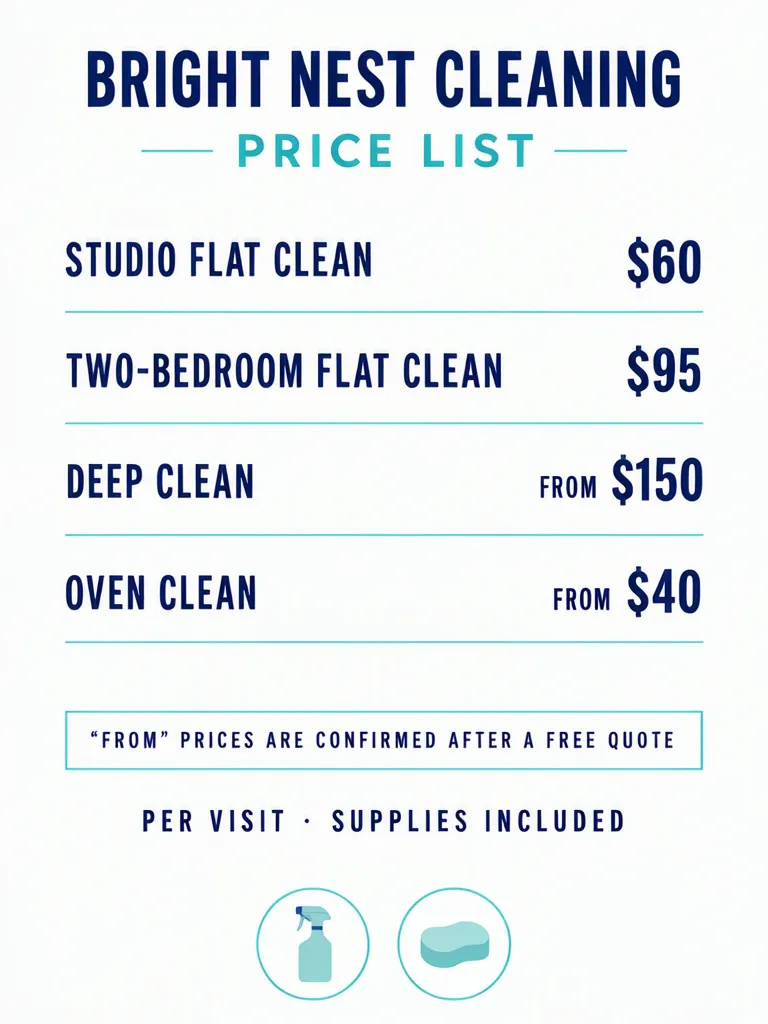
Start with a short list of services that customers can compare. Give each service one row, place the corresponding amount close to it, and state the unit. Our invented cleaning example has two fixed amounts, $60 for a studio flat clean and $95 for a two-bedroom flat clean, then two starting prices: from $150 for a deep clean and from $40 for an oven clean. A note says that “FROM” prices are confirmed after a free quote; the footer says per visit and supplies included. The shop and all prices are fictional examples.
Make one like this Open this image on MOSS Image
Made in the Layout Builder with these boxes:
| Box text or object | Purpose | Approximate position |
|---|---|---|
| BRIGHT NEST CLEANING | Business name | Top |
| PRICE LIST | Title | Below name |
| STUDIO FLAT CLEAN | Service name | First row, left |
| $60 | Fixed price | First row, right |
| TWO-BEDROOM FLAT CLEAN | Service name | Second row, left |
| $95 | Fixed price | Second row, right |
| DEEP CLEAN | Service name | Third row, left |
| FROM $150 | Starting price | Third row, right |
| OVEN CLEAN | Service name | Fourth row, left |
| FROM $40 | Starting price | Fourth row, right |
| “FROM” PRICES ARE CONFIRMED AFTER A FREE QUOTE | Starting-price condition | Box below rows |
| PER VISIT · SUPPLIES INCLUDED | Unit and inclusion | Footer |
| Spray bottle and sponge icons | Decoration | Bottom |
All 12 required lines were right on the first try. “FROM” appears smaller than the amounts on the two variable prices, and the quote condition is in its own outlined box. That hierarchy is useful only if it stays readable: a customer should notice that a starting amount is not the final quote. Confirm that each fixed amount is genuinely fixed for the described service and that the note explains the relevant variation.
How should you write a price that can change?
Put “from” directly beside the lowest starting amount, then state what determines the final price. The fictional cleaning poster says a free quote confirms its “FROM” prices. For a real catalog, the note might mention property size, condition or another factor only if that is genuinely how the business calculates the charge. Avoid presenting a variable amount like a guaranteed total.
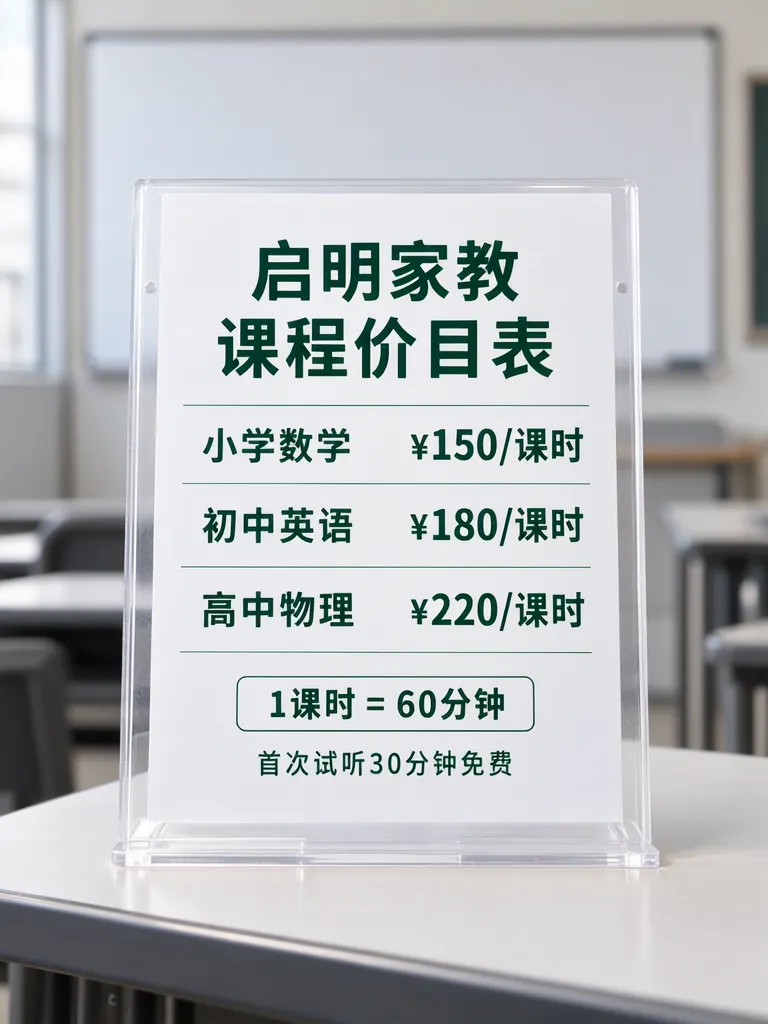
The tutoring example uses another useful pattern: pair the subject with a per-lesson amount and define the lesson unit. The Chinese rows read “小学数学 ¥150/课时” (primary-school mathematics, ¥150 per lesson), “初中英语 ¥180/课时” (middle-school English, ¥180 per lesson) and “高中物理 ¥220/课时” (high-school physics, ¥220 per lesson). The note says one lesson is 60 minutes and a first 30-minute trial is free. All seven lines were right on the first try, and the board behind the sheet is blank. The school, subjects and prices are invented examples.
Make one like this Open this image on MOSS Image
Made in prompt mode with this exact prompt:
Photograph of a printed price list in a plain clear acrylic stand on a desk in a small tutoring room, a whiteboard behind softly blurred and blank, the sheet flat and in sharp focus. White paper, dark green Chinese type, subjects on the left and prices on the right with thin rules, the note in an outlined box. The printed piece holds only the quoted text, and nothing else in view carries any writing: no other signs, labels, stickers or notes. Text, render exactly and add nothing else: top line '启明家教'; title '课程价目表'; row '小学数学 ¥150/课时'; row '初中英语 ¥180/课时'; row '高中物理 ¥220/课时'; boxed note '1课时 = 60分钟'; small line '首次试听30分钟免费'.
Here, the unit is part of the price itself. “¥150/课时” gives the amount and its basis together; “1课时 = 60分钟” defines that basis. Without those lines, readers could interpret the price differently. If the lesson duration varies by subject or package, show the applicable duration with that row instead of relying on a general footer.
| Catalog detail | Cleaning example | Tutoring example |
|---|---|---|
| Fixed or variable | $60 and $95 fixed; $150 and $40 from | Amount per lesson |
| Unit | Per visit | Per lesson |
| Included detail | Supplies included | One lesson is 60 minutes |
| Condition | Starting prices confirmed after a quote | First 30-minute trial free |
A price poster is a compact view of your catalog, not the place to invent missing terms. The salon service price poster covers an industry-specific example with service-price pairs and “from” wording; here the same catalog habit applies broadly to cleaning, tutoring and other services.
What should you proofread before sharing it?
Both versions were right on the first try, but an accurate sample does not validate your own catalog. Compare each service name and amount with the approved source list. Check fixed prices against their intended scope. For variable prices, ensure the “from” label is visibly attached to the number and the note explains how the amount is set. Check units, duration, inclusions and any introductory offer separately.
Then inspect the visual pairing: follow each service row across to its number. In the cleaning layout, services are on the left and amounts on the right; in the tutoring photo, the subjects and prices are separated by thin rules. If one label wraps, confirm that it still aligns with its own price. Review the poster at the size customers will see it on a phone, counter or printed sheet, especially small condition text. The generated result can arrange text attractively, but the business still needs to confirm that every number and condition is current.
How do you turn a service catalog into a price poster?
- In the Layout Builder, choose a 3:4 canvas and create one service box and one price box for each row.
- Put the unit next to every price. Label variable amounts “FROM” and reserve a separate note box for how the final price is confirmed.
- For a photographed sheet, use the AI poster generator and quote each row exactly, including spaces, currency symbols and lesson units.
- Check each service-price pairing, then verify the unit, duration, inclusions and variable-price note against the approved catalog. The JSON layout guide explains the separate-box approach.
MOSS Image Studio is an independent hosted studio for the open MOSS-Image model. Not affiliated with OpenMOSS.
FAQ
How do I make a service price list?
Choose the services customers need to compare, put each on its own row, and place the correct price and unit beside it. Add conditions that affect the final amount.
What does “from” mean on a price list?
It signals a starting amount rather than one guaranteed total. State what determines the final price and how the customer gets that amount confirmed.
Should a price list include the unit?
Yes. Say whether the price is per visit, per lesson, per hour or another unit, and define the unit when its length may be unclear.
What should I check on an AI-made price poster?
Verify every service-price pairing, currency, unit, duration, included item and condition against the current approved catalog.
Try it with your own words
Open the Studio, write a brief or lay out boxes on the canvas, and generate with MOSS-Image.