Volunteer Role Posters: Show the Task and Time Clearly
Learn how to state one volunteer task, separate its time commitment, and check eligibility and contact details with two practical poster examples.
A volunteer role poster should name one concrete task and show the time commitment as a separate, easy-to-find detail. “Volunteer with us” is an invitation, but it does not tell someone what they will do or how often they will come. We made two fictional library examples for shelving returned books, with a weekly schedule, age line and sign-up direction. The library and role details are examples, not an open position.
TL;DR
- Name one task instead of relying on a general recruitment slogan.
- Give the time commitment its own line or box.
- State who can join and where to ask, using confirmed details.
- Check role and time separately in the final image.
What should a volunteer role poster say first?
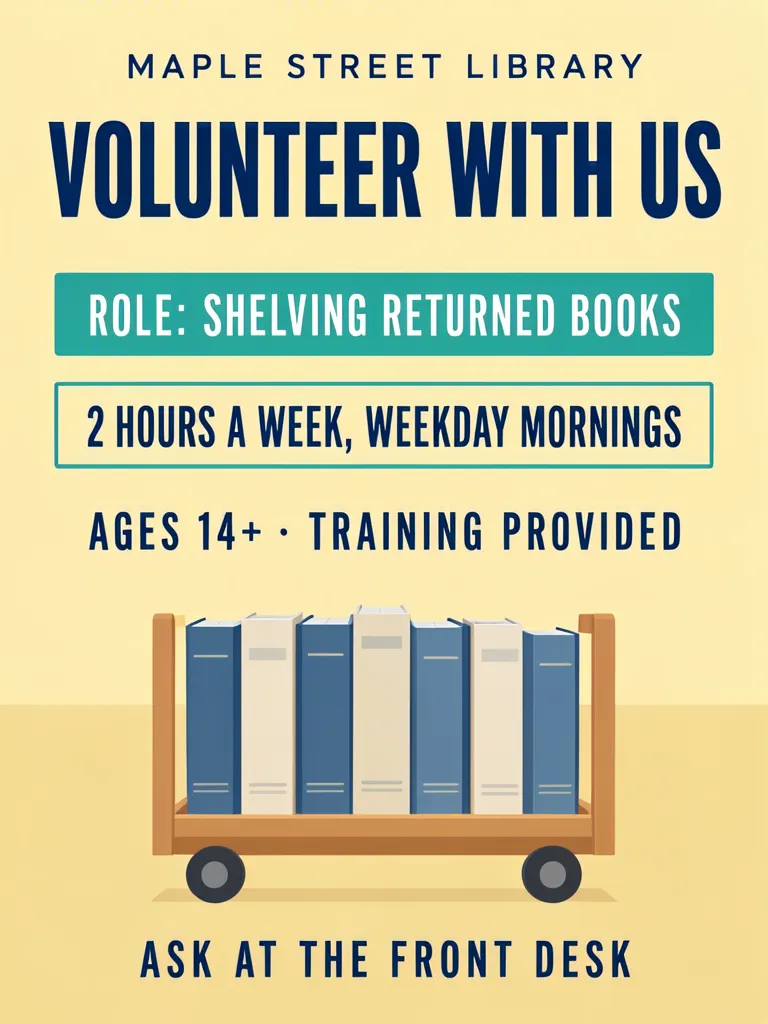
Lead with the task and the commitment. Our layout example says “ROLE: SHELVING RETURNED BOOKS” in one solid teal box and “2 HOURS A WEEK, WEEKDAY MORNINGS” in a separate outlined teal box. Other lines read “MAPLE STREET LIBRARY,” “VOLUNTEER WITH US,” “AGES 14+ · TRAINING PROVIDED,” and “ASK AT THE FRONT DESK.”
Make one like this Open this image on MOSS Image
Made in the Layout Builder with these boxes:
| Box text / object | Purpose | Approximate position |
|---|---|---|
| MAPLE STREET LIBRARY | Library name | Top |
| VOLUNTEER WITH US | Headline | Upper section |
| ROLE: SHELVING RETURNED BOOKS | One concrete role | Solid teal box, middle |
| 2 HOURS A WEEK, WEEKDAY MORNINGS | Time commitment | Separate outlined teal box below role |
| AGES 14+ · TRAINING PROVIDED | Eligibility and training | Lower section |
| Book cart with unmarked books | Illustration | Lower middle |
| ASK AT THE FRONT DESK | How to join | Bottom |
All six required lines were correct on the first try. In the layout, role and time each have their own area. This separation is useful even when the poster is read quickly: the task answers “what would I do?” and the schedule answers “what would I be committing to?”
Use an action and object rather than a category such as “library help.” Examples include “shelve returned books” or “sort donated supplies.” If volunteers rotate between tasks, say so instead of presenting one task as the whole role.
Why keep the time apart from the task?
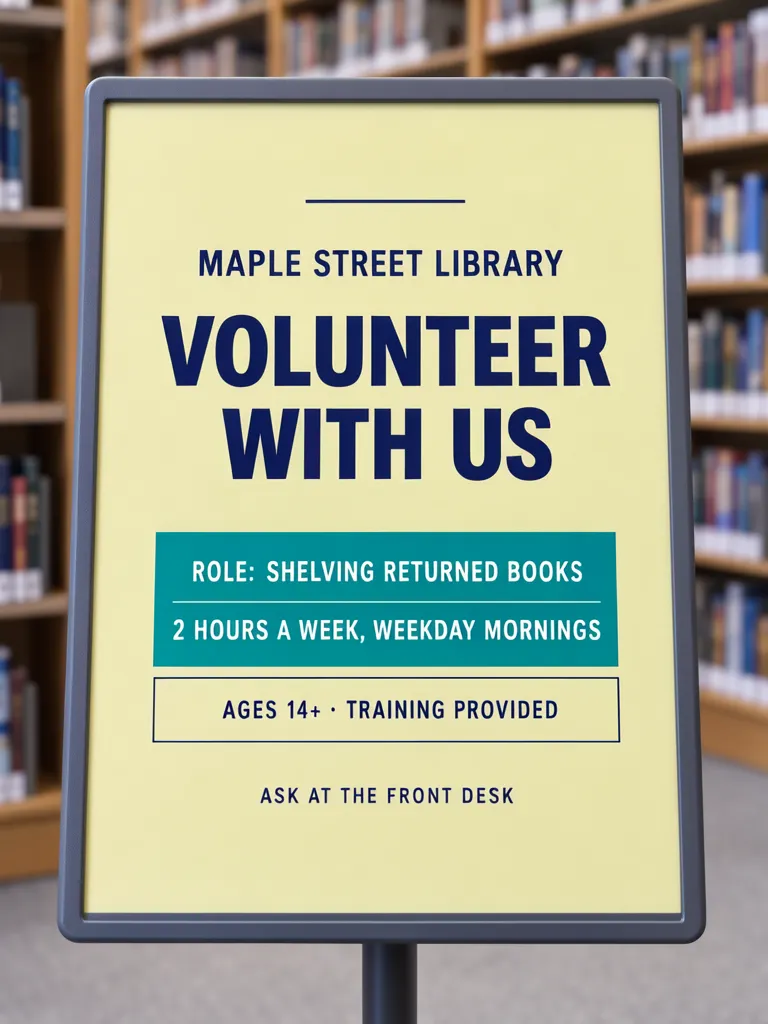
A separate time line lets a reader compare the commitment with their own availability without rereading a compound sentence. The layout version uses separate boxes, while the accepted photo version keeps the role and time together inside one teal box, separated by a thin rule. Both required lines are present, but the image’s visual grouping still merges the two fields more than the layout does.
Make one like this Open this image on MOSS Image
Made in prompt mode with this exact prompt:
Photograph of a printed volunteer poster in an upright sign stand at a library entrance, bookshelves far behind and so blurred that no spine can be read, poster flat and in sharp focus. Pale yellow paper, navy type, the role line in its own solid teal box and the hours line in a separate outlined box below it; the hours line has no label in front of it. The printed piece holds only the quoted text, and nothing else in view carries any writing: no other signs, labels, stickers or notes. Text, render exactly and add nothing else: name 'MAPLE STREET LIBRARY'; headline 'VOLUNTEER WITH US'; line 'ROLE: SHELVING RETURNED BOOKS'; line '2 HOURS A WEEK, WEEKDAY MORNINGS'; line 'AGES 14+ · TRAINING PROVIDED'; line 'ASK AT THE FRONT DESK'.
The photo prompt describes a separate box for each field, but the result puts both role and schedule inside one teal box. The shared image is try 2. On try 1, an extra “TIME:” label appeared before the hours, the role and time shared a box, and a maple leaf logo was added. We shortened the line introductions for the retry; the accepted version removed the extra label, though its visual grouping still differs from the layout.
That difference points to a practical choice. If you want two fields to read as separate commitments, drawing two boxes communicates the relationship more directly. A prompt can describe boxes too, but inspect whether the finished image actually separates them. Someone scanning a notice should not have to distinguish the task from its schedule using punctuation alone.
How do you write a role and commitment that fit?
Start with a verb and a tangible object or outcome: “shelve returned books” is more useful than “help in the library.” Then state the regularity and time period: “2 hours a week” tells a different story from “2 hours per shift.” Add the time of day if that narrows who can participate, such as weekday mornings. Use a range or rotation only if the organizer has confirmed it.
| Poster field | Example in our image | What to confirm before publishing |
|---|---|---|
| Role | Shelving returned books | Is this the actual main task? |
| Commitment | 2 hours a week | Is the figure weekly and accurate? |
| Schedule | Weekday mornings | Which days or time window does this mean? |
| Eligibility | Ages 14+ | Does the organization accept this age group? |
| Support | Training provided | Is training actually included? |
| Next step | Ask at the front desk | Is this the right contact point? |
Use the actual time period: per week, event or shift. For flexible schedules, explain how to choose a slot; for a fixed shift, add its hours when readers need them to judge availability. Make the next step usable in context: a front-desk direction belongs on a notice displayed near a staffed desk, while a digital post needs a confirmed contact route. Verify eligibility and training details too.
For another example focused on volunteer recruitment around an occasion, see our International Volunteer Day recruitment poster. That post covers the occasion and recruiting context; this one is about making the role field specific and keeping its time commitment visible.
What should you inspect before sharing the poster?
Read the role on its own, then read the commitment on its own. Ask whether the task is specific enough to picture and whether the hours and schedule can be understood without interpreting the headline. Compare each factual line with the organization’s confirmed information: role, time, eligibility, training and contact method.
Check at the intended viewing size. In a photo scene, inspect shelves and signs for added writing; the accepted example has grey bars on book spines and the poster as its main text surface.
In our photo example the role and time remained in one box even on the accepted try; the layout version keeps them apart. That is the main limitation demonstrated here. For a real recruitment notice, proof the whole message after generation and make sure the two fields have the hierarchy you intended. If changing the task or schedule later, update both the wording and the visual grouping rather than leaving stale details in the image.
How do you make a volunteer role poster?
- In the Layout Builder, choose a 3:4 canvas and draw separate boxes for the task and time commitment. Make each a short, complete phrase.
- Add confirmed eligibility, support and next-step details below those fields. Keep the role as an action, such as “shelving returned books,” and state whether hours are weekly, per shift or per event.
- To place the notice in a setting, use the AI poster generator with a 3:4 canvas. Quote the role and time as separate lines and inspect whether the generated boxes actually stay separate.
- Replace the fictional library and schedule with approved information. Check the role and hours independently, then verify eligibility, training and contact details against the organization’s real process. The JSON Layout guide explains how separate boxes describe a planned hierarchy.
MOSS Image Studio is an independent hosted studio for the open MOSS-Image model. Not affiliated with OpenMOSS.
FAQ
What should a volunteer recruitment poster include?
Name the role, its main tasks, the time commitment, relevant eligibility, how to join and a contact route. Include only details confirmed by the organization.
How do I describe volunteer hours on a poster?
State the amount and period together, such as hours per week or per shift. Add the days or time window when readers need that detail to decide whether they are available.
Should a volunteer poster list a specific task?
Yes. A concrete task helps readers understand what the role involves. If duties vary, explain that clearly instead of implying a single fixed task.
How do I make a volunteer poster easy to scan?
Give the task and the time their own lines or boxes, use a clear headline, and check the finished image at its intended display size.
Try it with your own words
Open the Studio, write a brief or lay out boxes on the canvas, and generate with MOSS-Image.