Bubble Tea Shop Posters for Three New Drink Launches
Plan bubble tea shop posters for fruit tea, milk tea and seasonal hot drinks, with practical checks for ingredients, price, availability and image details.
A bubble tea shop poster for a new drink should make the drink name, ingredients, price and availability easy to scan. We made three examples for a fictional shop: a grape jasmine fruit tea, a caramel milk tea and a seasonal hot longan red-date tea. Each uses a different visual treatment, so you can compare a structured layout with an illustrated prompt and a counter photograph.
TL;DR
- Put the drink name beside a short ingredient line and price.
- Add a clear availability line when a drink is limited or seasonal.
- Check the drink pictured against the words, especially hot or cold cues and ingredients.
- Ask for plain packaging when the cup should not carry a logo.
What should a new drink poster include?
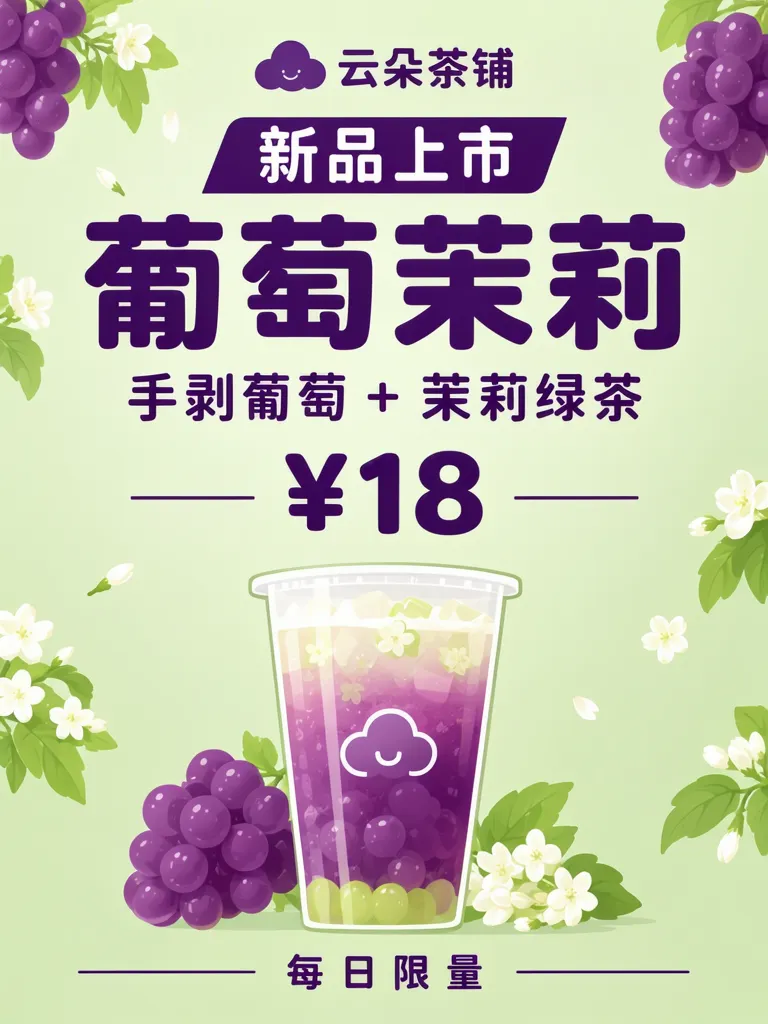
Keep the decision-making details together: a short launch label, the product name, one concise description, the price and when it is available. Our invented grape jasmine example pairs “葡萄茉莉” with “手剥葡萄 + 茉莉绿茶,” ¥18 and “每日限量” (limited daily). The shop name and “新品上市” (new arrival) sit above it. For your own poster, use the exact ingredient wording customers need, rather than a long promotional paragraph.
Make one like this Open this image on MOSS Image
Made in the Layout Builder with these boxes:
| Box text or object | Purpose | Approximate position |
|---|---|---|
| 云朵茶铺 | Shop name | Upper left |
| 新品上市 | Launch label | Upper left, below name |
| 葡萄茉莉 | Drink name | Large, center-left |
| 手剥葡萄 + 茉莉绿茶 | Ingredients | Below drink name |
| ¥18 | Price | Lower middle |
| Plain grape jasmine tea cup with grapes and jasmine flowers | Drink illustration | Right |
| 每日限量 | Availability | Lower right |
The six required lines were right on the first try. The model added a smiling cloud logo beside the shop name and printed it on the cup, although the cup was meant to be plain. That extra mark matters if your brand identity or packaging must stay clean; specify a plain cup and inspect the whole image for invented marks. The image is a fictional shop, product and price.
Can an illustrated prompt keep the product details clear?
It can give you a more atmospheric result, but the picture still needs to agree with the product description. The second example names 焦糖烤奶 (caramel milk tea), says oat milk can be substituted, lists ¥16 and gives a start date of December 1. All six lines were right on the first try, and the glass stayed plain. The requested cosy gouache look came out photographic instead, and the image added tapioca pearls that the copy never mentions. A customer could read those pearls as part of the drink, so check whether every visible ingredient is actually offered.
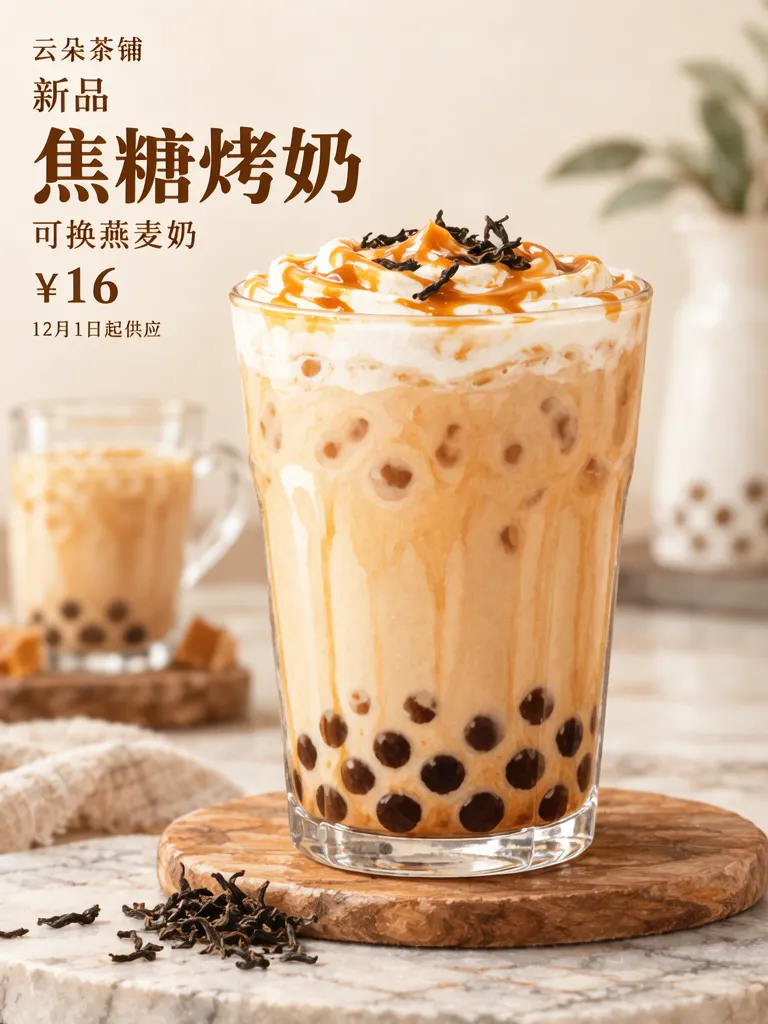
Make one like this Open this image on MOSS Image
Made in prompt mode with this exact prompt:
Bubble tea shop new drink poster, cosy gouache illustration of a tall plain glass of caramel milk tea with a swirl of caramel and a few roasted tea leaves, warm brown and cream palette, type in the top third. The glass has no logo or writing. The poster holds only the quoted text: no logo, no signature and no other words. Text, render exactly and add nothing else: small top line '云朵茶铺'; tab '新品'; drink name '焦糖烤奶'; line '可换燕麦奶'; price '¥16'; small line '12月1日起供应'.
The poster says “云朵茶铺” (Cloud Tea Shop), “新品” (new), “焦糖烤奶” (caramel milk tea), “可换燕麦奶” (oat milk can be substituted), ¥16 and “12月1日起供应” (available from December 1). Those are made-up example details. If a specific illustration style matters, judge the result against that style too; the prompt’s gouache direction did not carry through here.
How do you show a seasonal drink as hot?
Make the temperature visible in both the words and the scene. For the seasonal example, 热饮 means served hot, 少糖可选 means less sugar is an option, and 供应至2月底 means available through the end of February. The accepted image is the second try. Try 1 showed an iced drink under the hot-drink copy, added the cloud logo and shop name to the cup, and added doodles to the poster. In try 2, the glass mug has steam and no ice, and the text is right on the first accepted image; small corner ornaments still appeared on the poster. The wrong cold drink would have contradicted the headline, so compare the image with the promise before publishing.
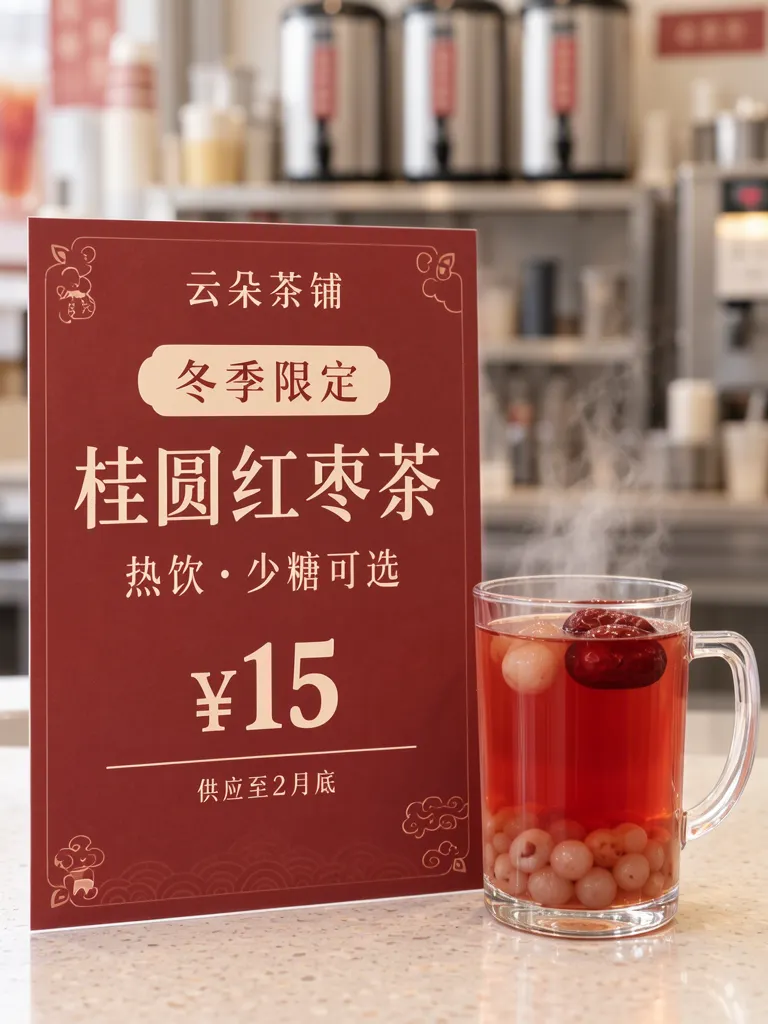
Make one like this Open this image on MOSS Image
Made in prompt mode with this exact prompt:
Photograph of a printed poster standing on a bubble tea shop counter beside a clear glass mug of hot red longan tea with steam rising and a red date floating on top, no ice, the shop softly blurred behind, the poster flat and in sharp focus. Deep red paper, cream type, no drawings on the poster. The glass mug is plain, with no logo or writing. The printed piece holds only the quoted text, and nothing else in view carries any writing: no other signs, labels, stickers or notes. Text, render exactly and add nothing else: small top line '云朵茶铺'; tab '冬季限定'; drink name '桂圆红枣茶'; line '热饮 · 少糖可选'; price '¥15'; small line '供应至2月底'.
A one-row-per-detail plan helps you proofread each launch before it becomes a poster:
| Detail | Example wording | Check |
|---|---|---|
| Name | 桂圆红枣茶 | Matches the drink being sold |
| Temperature and option | 热饮 · 少糖可选 | Picture shows a hot drink; option is accurate |
| Price | ¥15 | Matches the current price |
| Availability | 供应至2月底 | End point is clear and current |
The three designs answer different needs: a box-based layout makes hierarchy explicit, an illustration prompt can set a mood, and a photo scene gives the poster a counter context. The bubble tea topping board is a separate use case for listing add-on prices; a launch poster should keep attention on the new drink and its terms.
What should you check before posting?
Read every line against the approved product details, then inspect the picture as if it were a menu promise. In these examples, the milk poster’s added pearls are not in its copy, and the fruit poster received an unrequested cloud logo on the cup. The first seasonal attempt pictured an iced drink for a hot tea; the accepted second attempt corrected that mismatch but kept small corner ornaments. These are concrete reminders to verify ingredients, temperature, logos and decorations, not just spelling.
For your own launch, confirm the actual price, ingredient list, substitutions, start date and end date with whoever owns the menu. Check that “limited,” “seasonal” or “available from” matches the real offer. Zoom in on cup surfaces and poster corners, where small invented marks can be easy to miss. If the design is meant to show a particular art medium, compare the finished image with that direction before using it. A short launch card can be useful, while a full menu of sizes and customizations belongs on a separate price board.
How do you make a new drink poster?
- In the Layout Builder, choose a 3:4 canvas and make separate boxes for the drink name, ingredients, price and availability.
- Keep the name largest; use a short ingredient line, not a second paragraph. Add only options the shop actually provides.
- For an illustrated or counter version, use the AI poster generator and quote the final copy line by line. Describe whether the drink is hot or iced and whether the cup is plain.
- Compare every visible ingredient, logo and temperature cue with the copy, then confirm the prices and dates. The JSON layout guide explains how separate text boxes organize a design.
MOSS Image Studio is an independent hosted studio for the open MOSS-Image model. Not affiliated with OpenMOSS.
FAQ
What should a bubble tea new drink poster say?
Include the drink name, a short ingredient description, price and availability. Add a substitution or sweetness option only when it is part of the real offer.
How do I make a drink poster look seasonal?
Use a restrained seasonal palette or setting, then make sure the pictured drink still matches the serving temperature and ingredients in the text.
Should I put toppings on the drink poster?
Show only toppings that come with the drink or are part of the promotion. If they are optional extras with separate prices, list them on a topping board.
How do I check an AI-generated drink image?
Proofread the text and compare the cup, garnish, temperature, logo and decorations with the approved product details.
Try it with your own words
Open the Studio, write a brief or lay out boxes on the canvas, and generate with MOSS-Image.