How to Design Community Magazine Covers with Clear Teasers
Plan a community magazine cover with a distinct masthead, issue box and story teasers, then check how prompts affect background lettering.
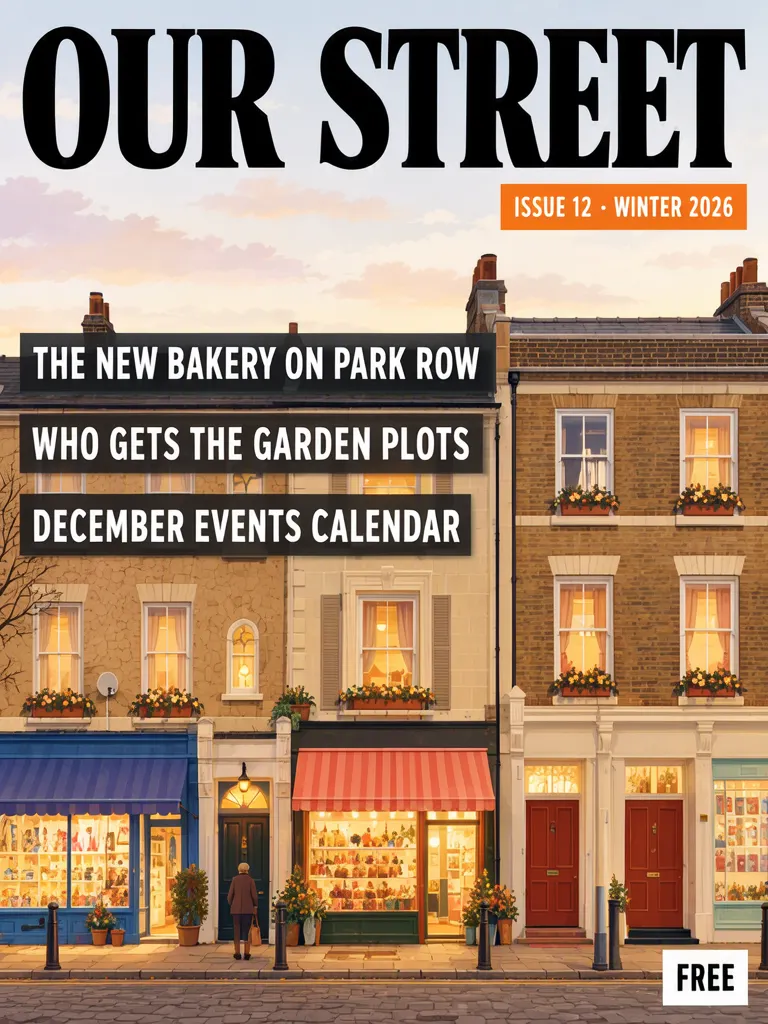
A community magazine cover can keep its publication identity, issue marker and story teasers in distinct places. We made two fictional OUR STREET covers for ISSUE 12 · WINTER 2026, with three invented story lines and a FREE label. The Layout Builder version puts the issue in a separate orange box; the photo prompt needed a second try after its first result printed prompt wording under the masthead and invented shop signs. Keep the masthead original and check every incidental word in the artwork.
TL;DR
- Give the masthead, issue marker and each teaser a separate role.
- A separate issue box makes the date or number easier to scan apart from headlines.
- Our photo version's first try added prompt words and garbled signs; the accepted second try removed them.
- Use an original publication name and proofread the whole image, including background objects.
How can a cover separate its masthead, issue box and teasers?
Use a clear hierarchy: the masthead identifies the publication, the issue marker gives its edition, and teasers preview articles. The sample name, issue, stories and FREE label are invented. The point is their visual relationship, not a real magazine or its reporting.
Make one like this Open this image on MOSS Image
Made in the Layout Builder with these boxes:
| Box text / object | Job | Approximate position |
|---|---|---|
| OUR STREET | Masthead | Across the top |
| ISSUE 12 · WINTER 2026 | Issue marker | Small orange box beneath masthead |
| THE NEW BAKERY ON PARK ROW | Story teaser | Dark strip, upper illustration |
| WHO GETS THE GARDEN PLOTS | Story teaser | Dark strip, middle |
| DECEMBER EVENTS CALENDAR | Story teaser | Dark strip, lower area |
| Terraced houses and small shops with blank awnings | Cover illustration | Main field |
| FREE | Corner label | Lower-right corner |
The issue marker has its own orange box below the large black masthead. Each teaser sits on a dark strip. In the illustration, the shop awnings are blank. This separation gives each kind of copy a distinct place and helps a reader distinguish the publication name from the issue details and article names.
Make one like this Open this image on MOSS Image
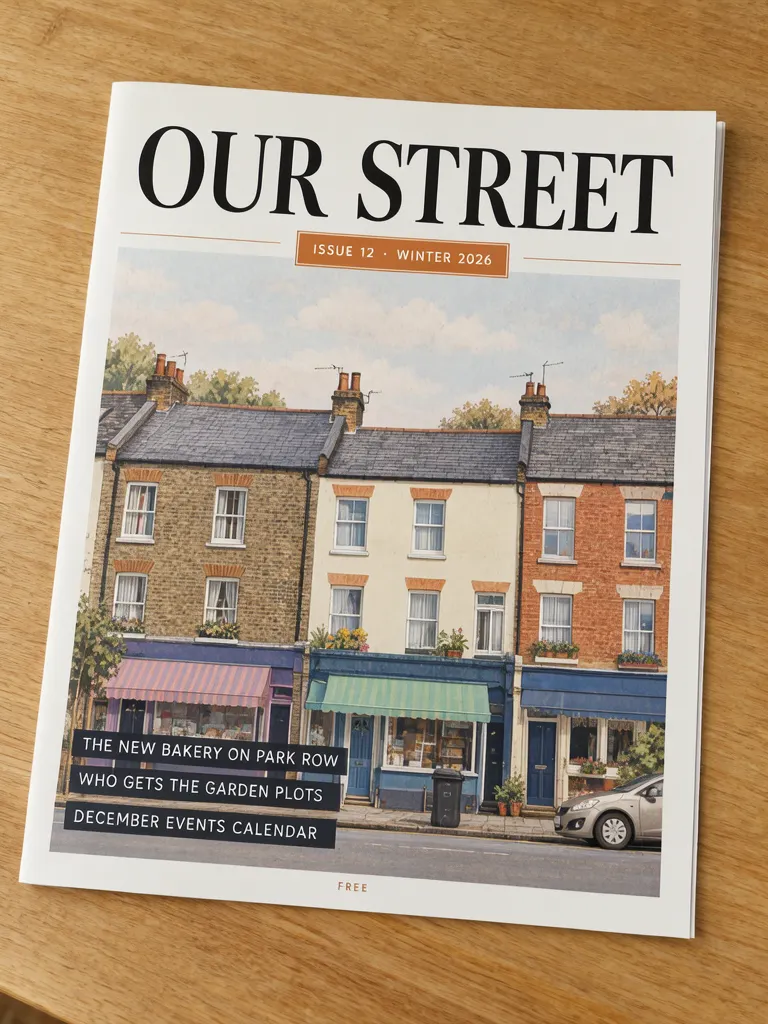
Overhead photograph of a printed community magazine lying alone on a bare wooden table, the cover filling most of the frame, flat and in sharp focus. Black serif masthead with nothing written under it, a small orange box for the issue, three teasers in white on dark strips. The cover art is a painted illustration of terraced houses with plain coloured awnings and no signboards; no building carries any lettering. The printed piece holds only the quoted text, and nothing else in view carries any writing: no other signs, labels, stickers or notes. Text, render exactly and add nothing else: headline 'OUR STREET'; small box 'ISSUE 12 · WINTER 2026'; line 'THE NEW BAKERY ON PARK ROW'; line 'WHO GETS THE GARDEN PLOTS'; line 'DECEMBER EVENTS CALENDAR'; small line 'FREE'.
The accepted photo is try 2. The first try did print the six required lines, but also put words from the prompt under the masthead: “NEIGHBOURHOUDR EXACTLY AND ADD NOTHING ELSE.” It drew garbled shop signs and added a label to a vase. The second prompt explicitly left the masthead area blank, described houses with plain awnings and no signboards, and kept the table bare. Try 2 had all six lines, nothing below the masthead and no lettering on the buildings. This is a practical difference between specifying the intended copy and also checking what background details might acquire writing.
| Cover element | Layout Builder version | Photo version |
|---|---|---|
| Publication name | Separate top text box | Headline line in prompt |
| Issue marker | Its own orange box below masthead | Small orange box |
| Story teasers | Three separate text boxes on dark strips | Three quoted lines on dark strips |
| Incidental writing | Blank awnings in illustration | Try 1 had garbled signs; accepted try 2 did not |
What should a community magazine masthead say?
Use a name you have permission to use and that belongs to your publication. Make its role clear through placement and type size, then keep the issue number or season in its own smaller area. Do not imitate a famous magazine's masthead, lettering or recognizable cover treatment. The example OUR STREET is made up for this cover and is not a claim about an existing publication.
Teasers need to read like short previews rather than a second masthead. Give each teaser its own line or box, keep the wording short enough for its strip, and check how the lines stack. For a local publication, the teaser list can be drafted independently from the cover art; the illustration does not need to spell out the stories.
The photo attempt also shows why the surrounding scene matters. A model can put writing on objects even when the desired copy is separately listed. Describing blank awnings and an empty table helped in this case. Use location words such as “under the masthead” for the area where nothing should be written, rather than putting a descriptive phrase next to quoted copy where it might be treated as another line.
Should you use boxes or a written prompt?
Boxes help when the issue marker and teasers need clearly separated regions. A written prompt can describe the cover as a printed object in a setting, such as a magazine on a bare table. In our images, the Layout Builder version defines an individual box for the masthead, issue, each teaser and FREE; the prompt version describes the composition in prose and gives each text line a positional label.
| Method | Useful for | Check first |
|---|---|---|
| Layout Builder | Assigning separate regions to issue details and teasers | Box order and relative position |
| Written prompt | Exploring a cover as a photographed object | Extra writing on buildings, props or the table |
The Layout Builder produces a layout from boxes you arrange and text you enter. The AI poster generator can explore a written scene prompt. Generated text remains part of the image, so treat either as a visual draft when exact editorial copy matters. Our JSON Layout guide covers the box approach, and the exact text guide discusses rendered wording.
What should you proofread on a magazine cover?
Read the masthead, issue marker, every teaser and any free or price label. Then scan the illustration and props for extra lettering. Our first photo try printed text from the prompt beneath the masthead, garbled signs on shops and a vase label; the accepted second try did not show writing under the masthead or on the buildings. A clean required copy list does not replace a full-image inspection.
The sample teasers and issue marker are fictional. Replace them with approved copy, and confirm any real publication's edition details before publishing. If you use a recognizable organization name or logo, make sure you have permission. Do not rely on a generated issue date or price without checking it against your publication schedule.
How do you make a community magazine cover?
- Choose an original masthead that belongs to your publication.
- Draft the issue marker separately from three short teasers; decide whether a FREE label is needed.
- In the Layout Builder, create one box for the masthead, one for the issue, one per teaser, and one for any corner label. For a scene-led exploration, try the AI poster generator.
- If the art includes shops or props, specify blank surfaces and avoid unnecessary labels. Inspect background lettering after generation.
- Read every line at cover size and again as a small thumbnail. See the poster prompt templates for ways to describe placement.
MOSS Image Studio is an independent hosted studio for the open MOSS-Image model. Not affiliated with OpenMOSS.
FAQ
What goes on a community magazine cover?
A publication name, an issue marker, a small set of article teasers and any relevant price or free label. Give each element a clear role and place.
How do I separate an issue number from cover stories?
Put the issue number in its own small box near the masthead, then give each story teaser a separate line or text box.
Can an AI cover invent words in the background?
It can add incidental lettering, as the first photo try did with shop signs and a vase label. Inspect the entire image and describe blank surfaces where needed.
Should I copy a well-known magazine masthead for a local publication?
Use an original identity for your publication. Avoid a famous masthead or recognizable cover treatment unless you have the rights to use it.
Try it with your own words
Open the Studio, write a brief or lay out boxes on the canvas, and generate with MOSS-Image.