How to Design Food-Truck Combo Menus with Clear Prices
See how to group combo names, included food and one total price, compare boxed and one-line menus, and proofread a food-truck board before service.
A food-truck combo menu should tell customers what each set includes and give it one total price. A short board can make that choice quick: one line for each combo, with the contents and amount kept together. The truck name, combo names, food, prices and market details in our examples are made up. We tested both a boxed layout and a photo-style board to see how each handles that compact information.
TL;DR
- Give every combo one clear name, included items and total price.
- Keep a price beside its own combo instead of in a shared list.
- Use separate boxes for predictable rows, or quote one complete line per combo.
- Check the entire board for added descriptions and signs before using it.
What belongs on a food-truck combo menu?
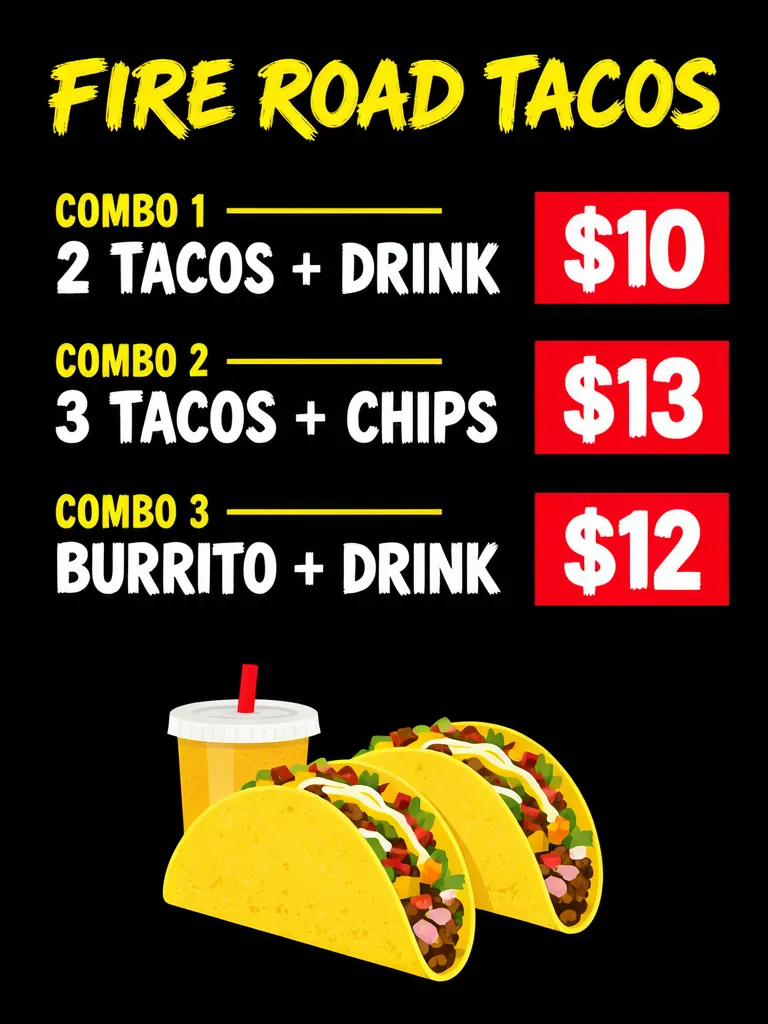
Each offer needs the included food and one total. Our sample has three choices: Combo 1 is two tacos and a drink for $10; Combo 2 is three tacos and chips for $13; Combo 3 is a burrito and drink for $12. The first image gives each combo name, contents and price its own boxes, with the price prominent at the end of its row.
Make one like this Open this image on MOSS Image
Made in the Layout Builder with these boxes:
| Box text / object | Job | Approximate position |
|---|---|---|
| FIRE ROAD TACOS | Truck name | Top |
| COMBO 1 · 2 TACOS + DRINK · $10 | First combo: name, contents, price in three boxes | Upper section |
| COMBO 2 · 3 TACOS + CHIPS · $13 | Second combo, same three boxes | Middle section |
| COMBO 3 · BURRITO + DRINK · $12 | Third combo, same three boxes | Lower section |
| Tacos and drink illustration | Food image | Bottom |
All ten required text pieces were correct on the first try. The box structure makes it easy to see that each amount belongs to the combo in the same group. Keep a total price attached to each offer, and state what is included rather than expecting customers to infer it from a food photo.
What did the photo-style menu need to get right?
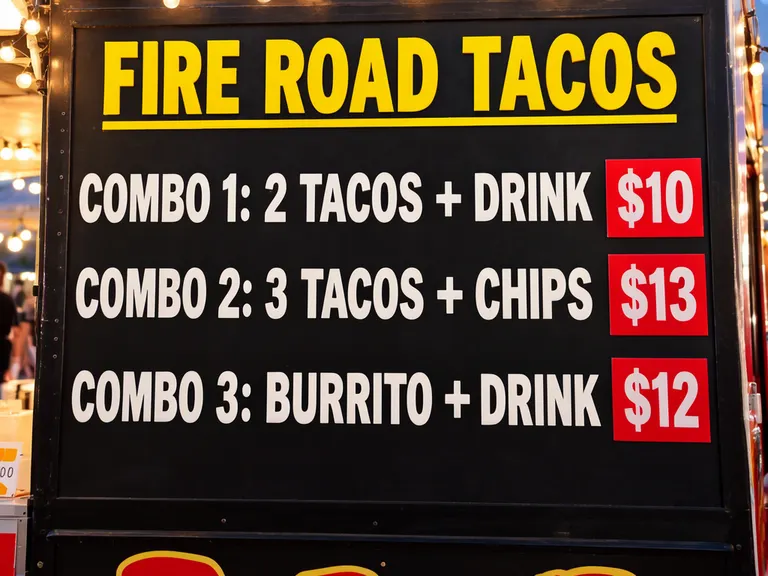
It needed to keep each combo on a single line and show nothing that was not on the menu. The first try had the truck name, combo names, contents and prices right, but split the rows into separate name, contents and price sections. It also invented garbled descriptions, a yellow sign and a burger photo. We changed the scene to a close-up of a plain black board holding only the quoted text, with one line per combo and no extra descriptions, food pictures or signs. The second image is that retry.
Make one like this Open this image on MOSS Image
Made in prompt mode with this exact prompt:
Close-up photograph of a plain black menu board mounted on the side of a food truck at an evening street market; the board fills most of the frame, flat and in sharp focus, string lights blurred at the edges. Yellow title, white combo lines, each price in a red box at the end of its line. Each combo is exactly one line of text with nothing written under it. The board holds only the quoted text: no descriptions, no food pictures, no other signs, stickers or labels anywhere on the truck. Text, render exactly and add nothing else: name 'FIRE ROAD TACOS'; combo 1 'COMBO 1: 2 TACOS + DRINK $10'; combo 2 'COMBO 2: 3 TACOS + CHIPS $13'; combo 3 'COMBO 3: BURRITO + DRINK $12'.
The shared retry has all four required lines correct, with each price at the end of its combo line in a red box. A blurred partial sign remains at the left edge — only the digits “00” come through — and unlettered shapes at the bottom, but no extra wording on the board itself. If the menu is in a real truck setting, inspect the edges and nearby surfaces as well as the main board.
Should each combo be a line or a group of boxes?
Use whichever arrangement makes the contents-price association easiest to scan. A line can be compact for a short menu; a boxed group gives more room to separate a combo’s name, contents and price.
| Structure | Useful when | Keep together |
|---|---|---|
| One line per combo | Space is tight and each offer is short | Name, included food and total |
| Separate boxes | You want a clear visual group for each offer | The combo label, contents and price |
This is the same practical lesson as the invented-text retry in our Black Friday offer examples: explicitly describe objects and surrounding surfaces that should carry no writing. For a menu, also say that each combo occupies exactly one line when that relationship matters.
What should you proofread before putting the menu out?
Read the board as if you are ordering: identify one combo, say what it includes, and point to its one total. Then compare every name and amount with the current menu. Make sure each offer reads the same on the board as everywhere else it is sold.
In a photo scene, extra text can turn up anywhere, so inspect the whole image, not just the board. Print or display a proof at its real viewing size so the menu’s rows and prices stay legible.
How do you make a compact combo board?
- In the Layout Builder, choose a 3:4 canvas and make a distinct group for each combo name, included items and total.
- Keep each price in the same group as its name and contents, then replace every example with the truck’s confirmed wording.
- For a truck-side photo scene, use the AI poster generator on a 4:3 canvas and quote one complete combo line at a time. Ask for a plain board that holds only those lines.
- Check that each line names the included items and ends with its intended total; inspect surrounding signs and labels for extra text. See the exact-text prompting guide for arranging quoted copy.
MOSS Image Studio is an independent hosted studio for the open MOSS-Image model. Not affiliated with OpenMOSS.
FAQ
What should a combo meal menu include?
State the combo name, every included item and one total price. Add any condition that changes who can order it or when it is available.
How do I keep a combo price next to the right food?
Place the amount on the same row or inside the same visual group as the included items. Proofread each name-price pair against the menu you plan to sell.
Should a food-truck menu show separate item prices too?
That depends on the menu and how customers order. If a combo is one total offer, make that total explicit; list individual prices only when customers need them to choose or order separately.
Try it with your own words
Open the Studio, write a brief or lay out boxes on the canvas, and generate with MOSS-Image.