AI Poster Long Paragraph Omissions: What to Shorten or Move
Compare two notice lengths, see what stayed intact and what was lost, then decide which details belong on a poster and which belong in a document or email.
An AI poster can reproduce a short paragraph and still lose words when a longer notice crosses line breaks. In our test, the 64-word paragraph came out word for word, while the 124-word version lost about nine words around a line break and dropped a letter from “dishwasher”; its phone number survived. Use a poster for the short notice and put full instructions in a document, email or printed sheet.
TL;DR
- A short paragraph worked in this sample; a longer one did not come through completely.
- Break poster copy into short lines with one instruction per line.
- Keep the full explanation in a document, email or separate handout.
- Check names, numbers and every line against the approved text.
Did the 64-word notice fit on the poster?
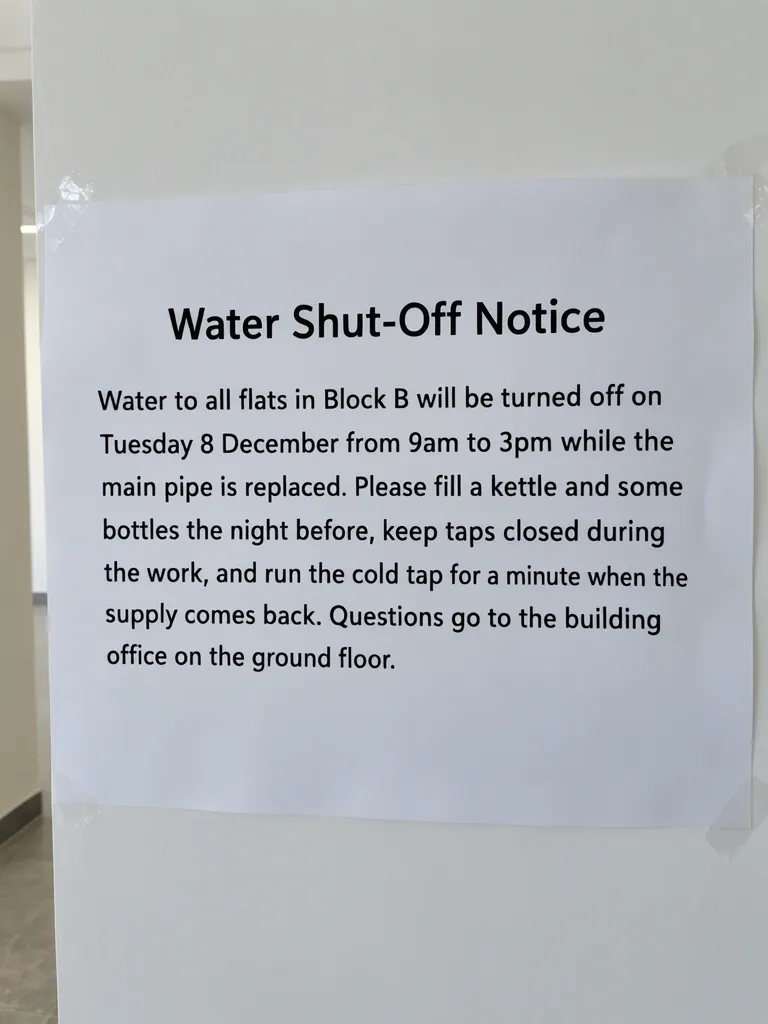
Yes. We generated the notice with a 64-word paragraph, and every word appeared correctly across seven lines. The notice says water to Block B flats will be off Tuesday 8 December from 9am to 3pm while a pipe is replaced; it asks residents to fill water containers, keep taps closed, run the cold tap afterward and contact the building office. These building details and the contact information in the examples are invented.
Make one like this Open this image on MOSS Image
Made in prompt mode with this exact prompt:
Photograph of a printed notice taped to a plain white lobby wall, soft daylight, the notice flat and sharp, white paper, bold black title, one paragraph of black body text. The printed piece holds only the quoted text, and nothing else in view carries any writing: no other signs, labels, stickers or notes. Text, render exactly and add nothing else: title 'Water Shut-Off Notice'; paragraph 'Water to all flats in Block B will be turned off on Tuesday 8 December from 9am to 3pm while the main pipe is replaced. Please fill a kettle and some bottles the night before, keep taps closed during the work, and run the cold tap for a minute when the supply comes back. Questions go to the building office on the ground floor.'.
This is a useful result, but not a reason to assume the same amount of text will always fit. The paragraph wraps across many lines, so proofreading requires following the full sentence through each break. A line can look plausible while a word or clause has disappeared.
What happened when the notice grew longer?
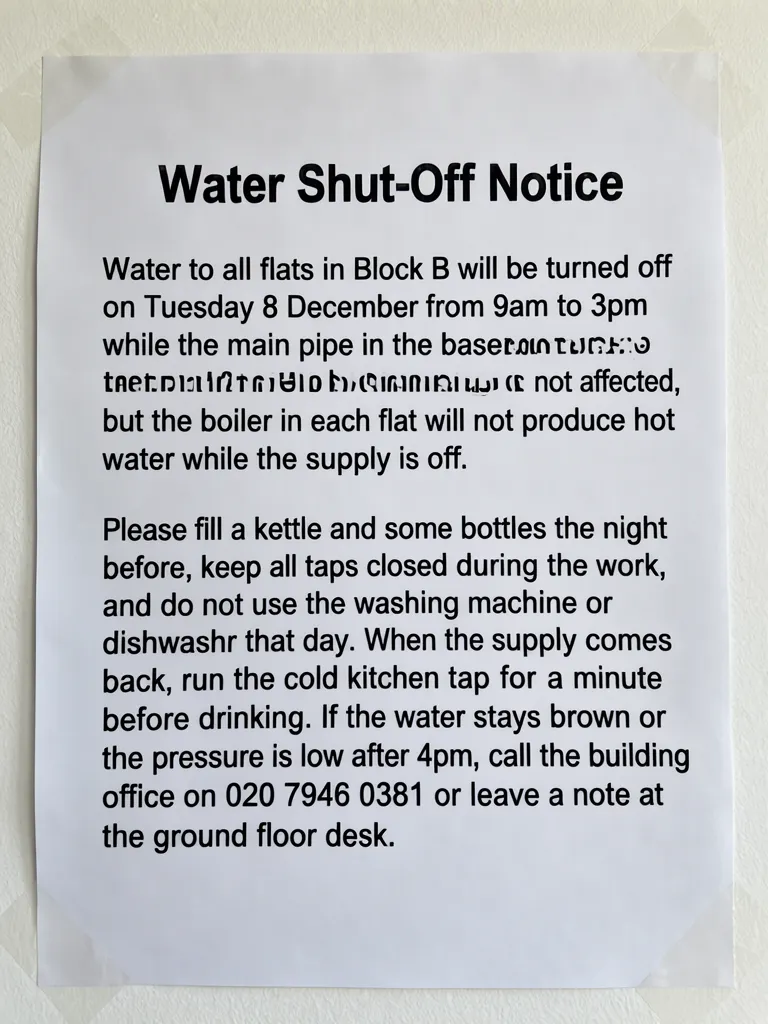
The 124-word version did not render word for word. About nine words were lost across a line break, and “dishwasher” appeared without its second “e.” The phone number, 020 7946 0381, remained intact. This is the longer version's observed result, not a universal cutoff or a stated maximum word count.
Make one like this Open this image on MOSS Image
Made in prompt mode with this exact prompt:
Photograph of a printed notice taped to a plain white lobby wall, soft daylight, the notice flat and sharp, white paper, bold black title, two paragraphs of black body text. The printed piece holds only the quoted text, and nothing else in view carries any writing: no other signs, labels, stickers or notes. Text, render exactly and add nothing else: title 'Water Shut-Off Notice'; first paragraph 'Water to all flats in Block B will be turned off on Tuesday 8 December from 9am to 3pm while the main pipe in the basement is replaced. The lifts and the heating are not affected, but the boiler in each flat will not produce hot water while the supply is off.'; second paragraph 'Please fill a kettle and some bottles the night before, keep all taps closed during the work, and do not use the washing machine or dishwasher that day. When the supply comes back, run the cold kitchen tap for a minute before drinking. If the water stays brown or the pressure is low after 4pm, call the building office on 020 7946 0381 or leave a note at the ground floor desk.'.
Read the rendered notice against the original in order. The first mismatch is not the whole story: keep checking later lines and the phone number rather than assuming that a surviving detail means the rest is intact.
Did shorter lines help in the comparison?
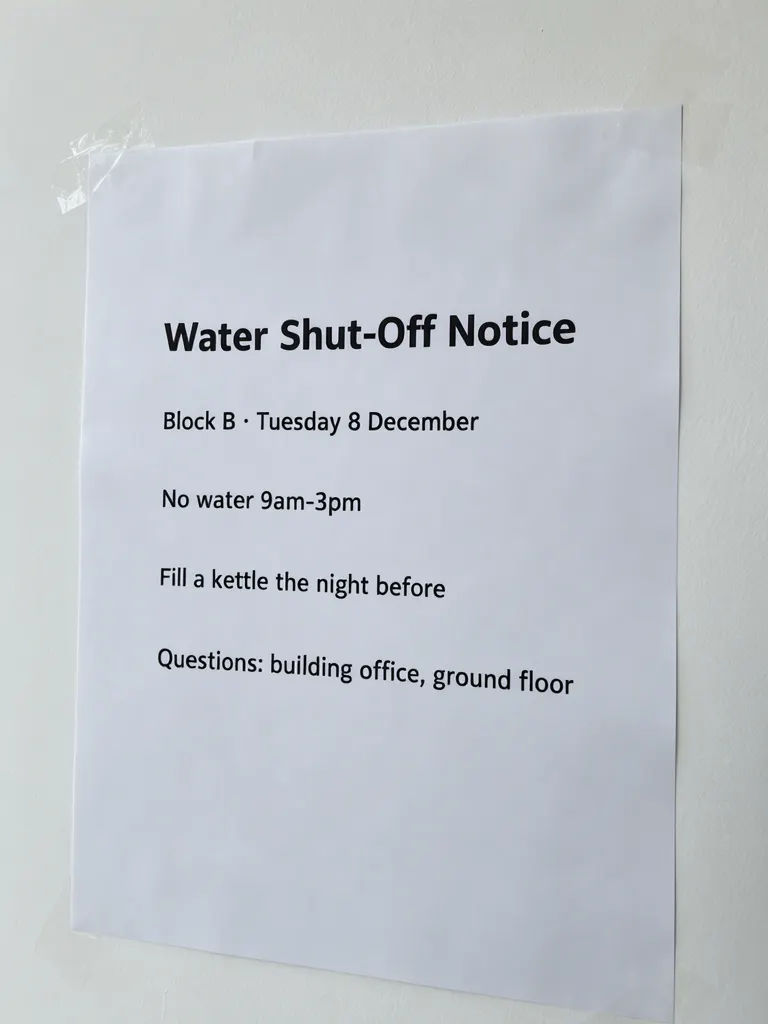
Yes. We condensed the notice into four short lines under the same title. All five text elements, including the title, came out correctly. The shorter version keeps the building and date together, gives the shut-off time one line, and leaves preparation and contact details as separate instructions.
Make one like this Open this image on MOSS Image
Made in prompt mode with this exact prompt:
Photograph of a printed notice taped to a plain white lobby wall, soft daylight, the notice flat and sharp, white paper, bold black title, four short black lines with space between them. The printed piece holds only the quoted text, and nothing else in view carries any writing: no other signs, labels, stickers or notes. Text, render exactly and add nothing else: title 'Water Shut-Off Notice'; line 'Block B · Tuesday 8 December'; line 'No water 9am-3pm'; line 'Fill a kettle the night before'; line 'Questions: building office, ground floor'.
When you shorten a notice, preserve the facts that change what a reader needs to do: the affected place, start and end time, preparation, restrictions and contact route. Remove background explanation from the poster only when it can safely live somewhere else. Do not compress a safety step until it becomes ambiguous.
| Copy type | Better home | Example from this notice |
|---|---|---|
| Essential alert | Poster headline and short lines | Block B, Tuesday, no water 9am–3pm |
| Immediate action | Poster line | Fill a kettle the night before |
| Longer explanation | Email or document | Pipe replacement details and unaffected services |
| Follow-up guidance | Full notice or handout | What to do when supply returns |
| Contact details | Poster if readers need them on site | Building office, ground floor |
How do you decide what copy to keep on a poster?
First, list each fact and instruction separately. Mark the ones a person must know while standing at the notice. Keep those in short, direct lines. Put background, exceptions and detailed follow-up steps in an email or printable sheet that can carry complete sentences. Then compare the final poster line by line with the source text, paying close attention to words split by a wrap and any numbers.
The 64-word and 124-word notices are two data points from one comparison. They show why a short block is easier to inspect and why more complete copy may belong in a format designed for paragraphs. Adding another descriptive adjective to a prompt does not remove the need to make that decision about the content.
How can you build a shorter notice in the generator?
- Open the AI poster generator and use a 3:4 notice layout like these examples.
- Write the title, date, affected area, time window, action and contact as separate quoted lines.
- Generate a compact version and compare every word, number and punctuation mark with the source.
- Put remaining explanation into a document, email or printed sheet, then proofread that complete copy separately.
The exact-text guide covers writing quoted copy for generated posters.
MOSS Image Studio is an independent hosted studio for the open MOSS-Image model. Not affiliated with OpenMOSS.
What are the limits of a long generated notice?
The short paragraph was exact, but the longer version lost about nine words across a line break and misspelled “dishwasher”; the phone number remained correct. Do not infer a safe word limit from these two lengths. Proofread the entire image and place details that need complete wording in a document, email or printed page.
FAQ
How much text should an AI notice poster contain?
Keep the poster to the alert and actions readers need immediately. Move detailed explanations to a document or email when complete wording matters.
Why can a long paragraph lose words in an image?
Text is rendered as part of the image, and a long block can wrap across many lines. Inspect every line against the approved copy.
Should I put a phone number on the poster?
Include it when readers need to contact someone at the notice location, then check every digit against the source.
Is a shorter generated notice guaranteed to be correct?
No. Our short version was correct in this test, but every generated line still needs review.
Try it with your own words
Open the Studio, write a brief or lay out boxes on the canvas, and generate with MOSS-Image.