AI Poster OCR Disagreement: Check the Pixels, Not the Score
Compare ornate script and plain poster lettering to see how OCR can disagree with readable text, then follow a practical pixel review before printing.
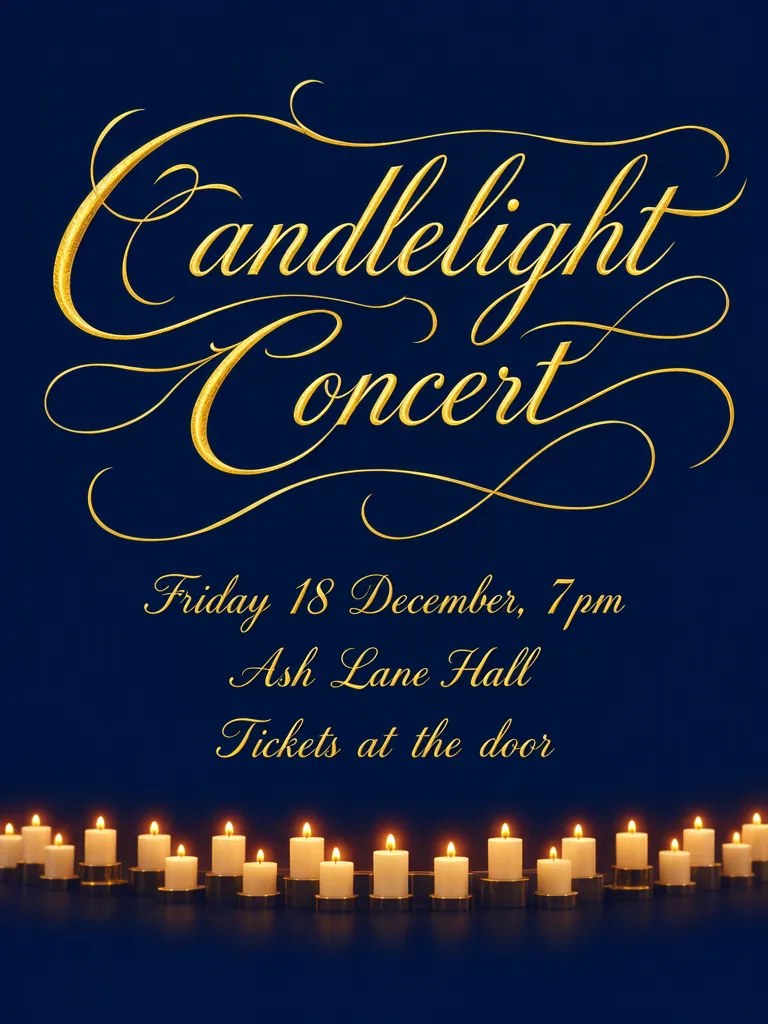
OCR disagreement on an AI poster is a prompt to inspect the image, not a pass or fail score. We generated two versions of the same four-line concert poster: the ornate script was correct by eye, though OCR lost the title and misread three words; the plain-letter version was correct both by eye and in OCR. The event name, date, venue and ticket wording are invented examples.
TL;DR
- Treat OCR as a flag that sends you back to the pixels.
- Compare each line with the approved copy, especially decorative lettering.
- Check the title, names, date, time and punctuation separately.
- Never use an OCR result as a model accuracy rate.
What did OCR get wrong on the script poster?
The poster itself reads correctly. We ran tesseract 5.5.0 with its English model on the downloaded image. It returned the title as “ae,” read “Friday” as “Sriday,” “Ash” as “Ask,” and “Tickets” as “Tickels.” It also returned a junk line from the candle row. Looking at the pixels, all four requested lines are spelled correctly.
Make one like this Open this image on MOSS Image
Made in prompt mode with this exact prompt:
Flat poster on deep navy, the headline in ornate flowing gold script lettering with long swashes, the other lines in smaller gold script, a row of small candles at the bottom. The poster holds only the quoted text: no logo, no signature and no other words. Text, render exactly and add nothing else: headline 'Candlelight Concert'; line 'Friday 18 December, 7pm'; line 'Ash Lane Hall'; line 'Tickets at the door'.
The title is decorative and has long strokes that meet or sweep away from the letterforms. That is the kind of treatment where a text recognizer can fail even when a person can read the line. The result is useful as a reminder to zoom in and compare what is actually drawn with the source wording.
Does plain lettering give OCR the same problem?
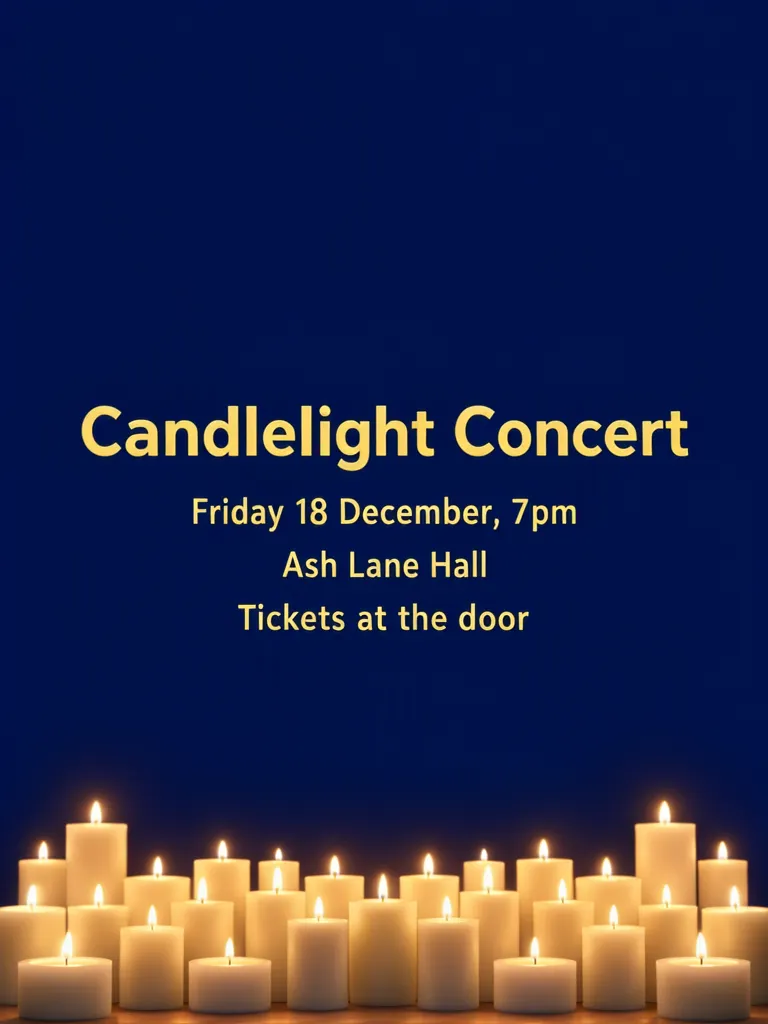
No, not in this pair. The second poster has plain upright sans-serif lettering. We asked for the same wording and checked the same four lines. Tesseract returned all four exactly, and our visual check agreed.
Make one like this Open this image on MOSS Image
Made in prompt mode with this exact prompt:
Flat poster on deep navy, the headline in plain bold upright gold sans-serif letters, the other lines in smaller plain gold sans-serif, a row of small candles at the bottom. The poster holds only the quoted text: no logo, no signature and no other words. Text, render exactly and add nothing else: headline 'Candlelight Concert'; line 'Friday 18 December, 7pm'; line 'Ash Lane Hall'; line 'Tickets at the door'.
The pair illustrates why a recognizer's output should not be mistaken for a visual judgment. In the ornate version, every disagreement was OCR's error. In the plain version, both checks matched. That is what happened on these two images; it does not establish an OCR accuracy rate or a general rate for the image model.
| Review step | What to compare | What this pair shows |
|---|---|---|
| OCR text | Recognized words against approved copy | Script OCR differed on four lines and returned candle noise |
| Image pixels | Visible letter shapes against approved copy | All four script lines were correct by eye |
| Second style | Repeat visual check on the plain poster | All four lines matched in OCR and by eye |
If a recognizer flags a line, open the original image at full size. Trace the letter shapes rather than accepting the extracted text. If it does not flag a line, still compare the pixels: a recognizer can miss a problem, and decorative styling may make correct lettering hard for it to parse.
How should you proofread a generated poster?
Use the final copy as a checklist. Start with details that would cause the most confusion if wrong: names, dates, locations, prices, contact details and calls to action. Then inspect capitalization, apostrophes, commas and line breaks. Compare one line at a time, and mark each as confirmed only after looking at its pixels.
| Check | A practical method |
|---|---|
| Headline | Compare every word and letter, including words in script |
| Event details | Read the date, time and venue independently |
| Small footer | Zoom in and confirm the full line, not just its first words |
| Extra marks | Check whether decoration or objects look like extra writing |
For a high-stakes notice, ask another person to read the image while you follow the source copy. The second reader should say what they see, not what they expect to see. This can expose a letter that your familiarity with the intended phrase causes you to fill in automatically.
How can you make a poster with text worth checking?
- Open the AI poster generator and choose a 3:4 poster canvas, as in our examples.
- Keep the wording short and quote each line in the prompt. Give the title and supporting lines their own clear roles.
- Generate the image, then compare each line with your approved copy. Use OCR only to point out text that may need another look.
- Zoom into decorative letters and small details. Check the actual pixels even when OCR reports a clean match.
The exact-text guide explains how to quote poster copy.
MOSS Image Studio is an independent hosted studio for the open MOSS-Image model. Not affiliated with OpenMOSS.
What are the limits of OCR checks?
This test is a comparison of two images, not a measurement of OCR or model accuracy. The script image was visually correct while OCR misread its title and three words; the plain image was read exactly. Neither outcome means OCR can approve or reject a different poster. Check the title, every event detail and any small text against the image itself.
FAQ
Can OCR tell me whether an AI poster is correct?
It can help locate text to inspect, but it cannot substitute for comparing the visible image with the approved wording.
Why can OCR misread script lettering?
Decorative strokes and letter connections can make recognition difficult. Inspect the drawn letters at full size.
If OCR reads every line, can I skip proofreading?
No. Review the pixels anyway, particularly dates, names and small print.
What should I do when OCR and the poster disagree?
Compare the original image against the source copy one line at a time. Correct the text based on what is visibly drawn.
Try it with your own words
Open the Studio, write a brief or lay out boxes on the canvas, and generate with MOSS-Image.