How to Make Recipe Ebook Covers Read at Thumbnail Size
Plan a recipe ebook cover with a readable title, subtitle and food art, then inspect thumbnail legibility, cookware marks and publishing requirements.
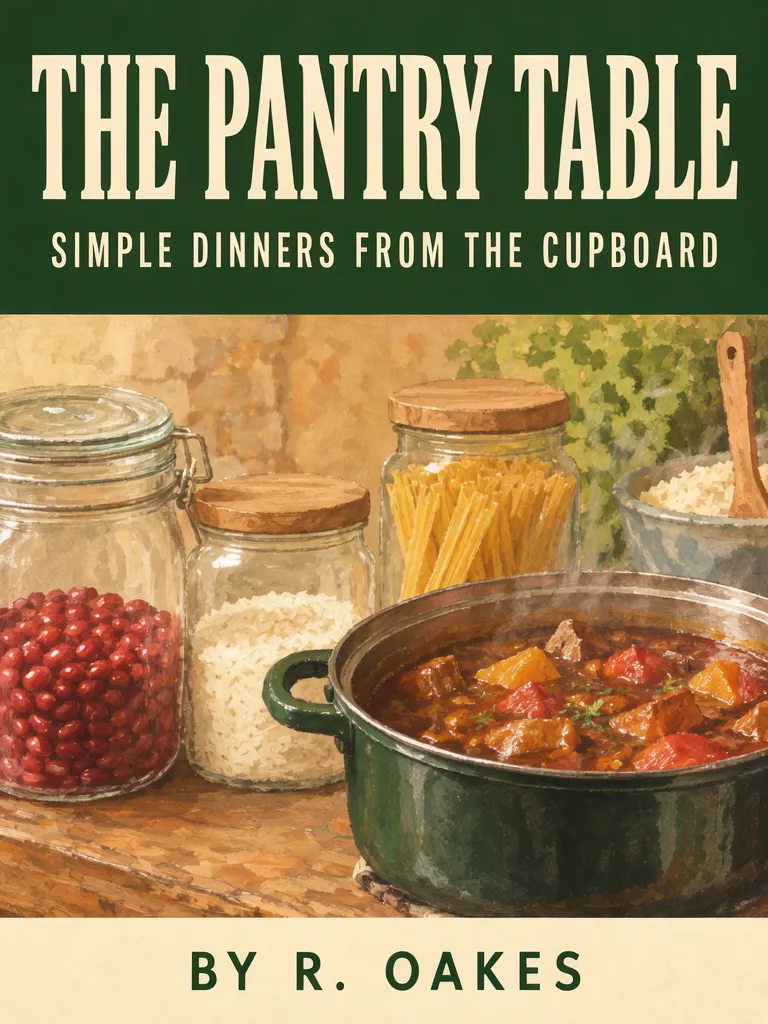
A recipe ebook cover needs a title that remains readable when the image is small, with the food illustration supporting rather than competing with it. We made two fictional covers for THE PANTRY TABLE: one with a large title band over pantry jars and stew, and one as a photographed arrangement. The layout version gives the title more room; the accepted photo result keeps it on one smaller line. Check a thumbnail and inspect objects that commonly carry maker marks.
TL;DR
- Keep the main title distinct from a longer subtitle and author line.
- Preview the cover at thumbnail size, not only full screen.
- The accepted photo try removed maker-like lettering from a pot handle; zoom in on objects that may carry a mark.
- Treat both images as concepts and confirm any file requirements with your publishing destination.
How do you make a recipe ebook title readable at thumbnail size?
Give the title its own high-contrast area and check it at the small size readers are likely to see. Our fictional title is THE PANTRY TABLE, with the subtitle SIMPLE DINNERS FROM THE CUPBOARD and author BY R. OAKES. The layout cover makes the main title large; the accepted photo cover keeps it on one line, but smaller.
Make one like this Open this image on MOSS Image
Made in the Layout Builder with these boxes:
| Box text / object | Job | Approximate position |
|---|---|---|
| THE PANTRY TABLE | Main title | Large dark green band at top |
| SIMPLE DINNERS FROM THE CUPBOARD | Subtitle | Same top band, beneath title |
| Unlabelled jars and pot of stew | Food illustration | Main field below title |
| BY R. OAKES | Author | Small cream band at bottom |
The title is large and readable in the result, and the jars have no labels. The separate subtitle and author boxes establish their roles while the illustration fills the central area. For a real ebook, use the words and author credit you are entitled to publish; the example's author name and cookbook copy are invented.
Make one like this Open this image on MOSS Image
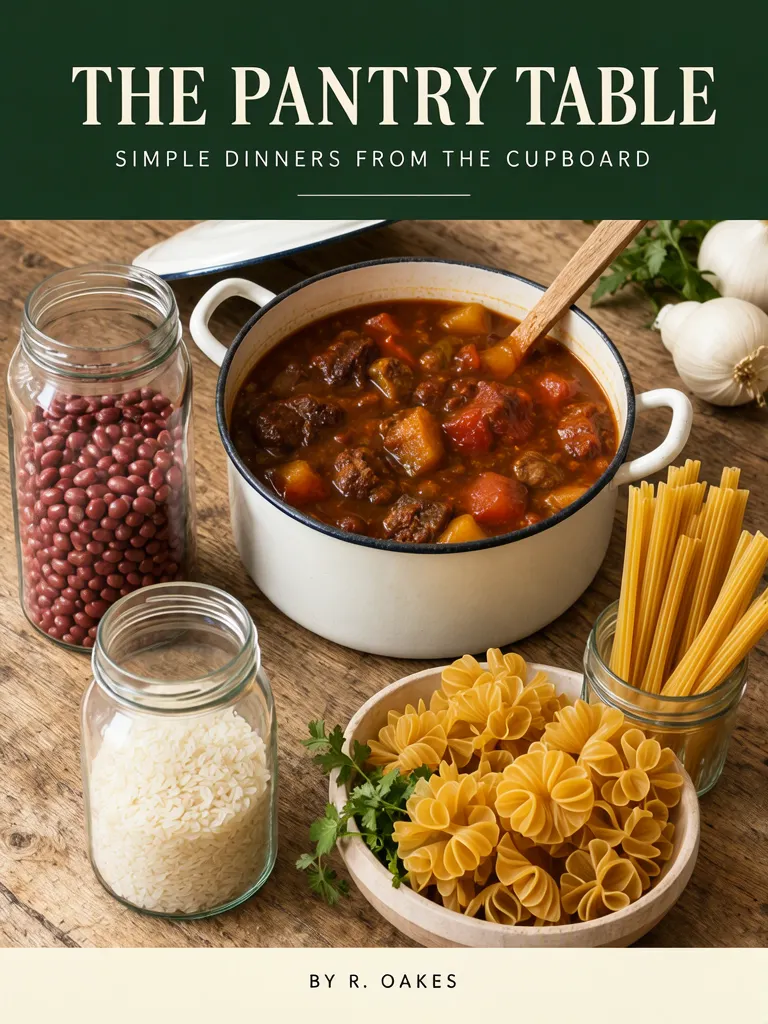
Recipe ebook cover, front view, flat. Overhead photograph of a wooden table with plain unlabelled glass jars of beans, rice and pasta and a pot of stew, a dark green band across the top with the title in large cream serif type, a cream band at the bottom with the author. The pot is plain enamel with no markings on its body or handles; the jars, pot and table carry no writing or embossing. The printed piece holds only the quoted text, and nothing else in view carries any writing: no other signs, labels, stickers or notes. Text, render exactly and add nothing else: headline 'THE PANTRY TABLE'; line 'SIMPLE DINNERS FROM THE CUPBOARD'; small line 'BY R. OAKES'.
The accepted photo is try 2. Try 1 rendered the cover text correctly but put embossed, maker-like lettering on the pot handle. Try 2 specified plain enamel with no markings and kept the jars unlabelled; the title remained on one line but was smaller than in the layout cover. Pots, pans, appliances and packaging often have a surface where brand-like marks could appear, so zoom in on those areas when reviewing the image.
| Version | Title treatment | What the scene contributes | Check |
|---|---|---|---|
| Layout Builder | Large title on a dark green band | Painted jars and stew | Thumbnail legibility and hierarchy |
| Photo prompt | One-line, smaller title | Jars and pot on a wooden table | Pot handles and other marked surfaces |
How should the title and subtitle fit together?
Let the title say what the book is called and let the subtitle add a short description. In this example, THE PANTRY TABLE is the main title; SIMPLE DINNERS FROM THE CUPBOARD tells the reader the recipe theme. The subtitle is longer, so do not give it the same visual weight by default. If it becomes too small at thumbnail size, simplify the subtitle or allocate more room to it.
The author credit is another distinct element. Put it in a quieter area, and check the spelling and punctuation against the actual credited name. Do not invent a real person's attribution for a cover. The title, subtitle and byline in these sample images are fictional strings.
An image can be attractive at full size and still fail as a small cover if the main title blends into its background. Make a thumbnail preview by reducing the image in a viewer or on a page. Check whether the first read is the book title, then whether the subtitle and author remain legible without taking over.
Should you use layout boxes or a photo prompt?
Use separate boxes when you want to assign clear regions to the title, subtitle, illustration and author. Use a written prompt when exploring a particular scene, such as jars and a pot arranged on a wooden table. Our layout cover has distinct text boxes and a central illustration; the photo cover describes the entire photographed setting and text hierarchy in prose.
The Layout Builder lets you place boxes and enter their text, while the AI poster generator is suited to a written scene description. Generated type is part of the image, so inspect the lettering instead of assuming it is editable. See the JSON Layout guide for box planning and the exact text guide for text rendering.
| Choice | Works well for exploring | First review |
|---|---|---|
| Layout boxes | Relative title, subtitle and author placement | Whether each line stays in its intended region |
| Written scene | Artwork and physical objects around the cover | Small lettering on objects and title size |
What should you inspect before using a recipe cover?
Read the title, subtitle and author line, then zoom into props with surfaces that often bear maker marks. In our photo try 1, the pot handle had embossed brand-like lettering; the accepted try 2 had a plain cream pot and unlabelled jars. Also check that the title can be read at thumbnail size, since the photo version's one-line title is smaller than the layout version.
These examples are concept images, not confirmed print-ready files. We did not test any ebook store or publisher's cover dimensions, file format, resolution, bleed or upload rules. Check the current requirements of the destination where you plan to publish. Confirm the author credit and recipe description, too, before releasing a real book.
How do you make your own recipe ebook cover?
- Choose a concise title and a subtitle that explains the recipe theme without competing with it.
- Decide where the title, subtitle, artwork and author credit should sit. Use separate boxes in the Layout Builder, or describe a scene in the AI poster generator.
- Keep the title area high contrast and generate a cover concept.
- Reduce it to thumbnail size. Check that the title reads first, and that the subtitle remains useful.
- Zoom in on pots, jars, appliances and packaging for accidental marks or labels. Confirm the destination's file requirements separately. The poster prompt templates offer more placement examples.
MOSS Image Studio is an independent hosted studio for the open MOSS-Image model. Not affiliated with OpenMOSS.
FAQ
What should a recipe ebook cover include?
A clear book title, an optional descriptive subtitle, artwork that signals the recipe theme, and an accurate author credit. Keep each element easy to distinguish.
How can I check a cookbook title at thumbnail size?
Reduce the cover to the size where it may appear in a list or library and see whether the main title is still the first clear read.
Can generated cookbook art include accidental brand marks?
It can. Our first photo try had maker-like embossing on a pot handle, so inspect handles, cookware, jars and packaging closely.
Is an AI recipe ebook cover print-ready?
Do not assume it is. Confirm dimensions and file rules with the publisher or storefront, then prepare the file to meet those requirements.
Try it with your own words
Open the Studio, write a brief or lay out boxes on the canvas, and generate with MOSS-Image.